

Enterprise Services Repository (ESR) in SAP Process Orchestration: designing integrations that scale (instead of collapsing)
Category:Programming,SAP,SAP PI/POHard truth (no sugarcoating)
If your ESR design layer is messy, your operations will pay the price: unmaintainable mappings, hidden dependencies, and exploding delivery times. The ESR is not just another repository; it is your integration contract factory. Either you govern it with discipline… or it governs you.
1) What is the Enterprise Services Repository (ESR)?
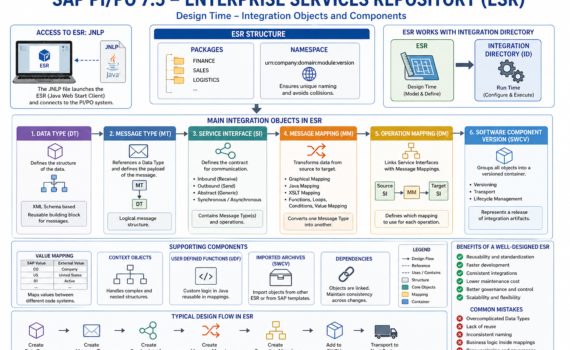
The ESR is the repository where all integration artifacts are modeled: data structures, service contracts, and transformations. It is the single source of truth for design.
Executive analogy:
ESR is like the architecture department of a construction company. If the blueprint is wrong, the building collapses—even if execution is flawless.
2) Why ESR matters to the business
- Reduces time-to-market (object reuse)
- Avoids technical debt (clear contracts)
- Increases governance (versioning and traceability)
- Enables scalable integrations
Key KPI: reuse rate of Data Types and Service Interfaces.
If you’re below 40%, you’re reinventing the wheel.
3) Accessing ESR: the infamous JNLP
The traditional ESR is accessed via a Java Web Start client using a JNLP (Java Network Launch Protocol) file.
What is JNLP?
A file that:
- Defines the server URL
- Specifies the client to launch
- Opens the design tool
Analogy:
JNLP is the master key to your integration factory.
Modern considerations
- Java dependency (security/compatibility issues)
- Local configuration requirements (certificates, proxy)
- Shift toward web-based tools (but ESR is still widely used)
4) ESR structure: packages and namespaces
Packages
Group objects by functional domain:
- FINANCE
- SALES
- LOGISTICS
Namespaces
Ensure unique naming across the system.
Analogy:
Packages = folders
Namespace = internet domain (prevents collisions)
Best practice:
Use consistent naming:urn:company:domain:module:version
5) Data Type (DT): the foundation of everything
The Data Type defines the data structure (fields, hierarchies, types).
Characteristics
- Based on XML Schema
- Supports complex structures
- Reusable
Analogy
A Data Type is the product mold.
Best practices
- Avoid redundancy
- Design granular structures
- Version properly
6) Message Type (MT): the message wrapper
The Message Type references a Data Type.
Function
Defines the logical payload of the message.
Analogy
If the Data Type is the mold, the Message Type is the packaged product ready to ship.
7) Service Interface (SI): the contract
Defines how systems communicate.
Types
- Outbound (sending)
- Inbound (receiving)
- Abstract (generic)
Elements
- Message Types
- Mode (synchronous/asynchronous)
Analogy
A legal contract: defines what is sent, how, and when.
Hard truth:
If your interfaces are poorly designed, the issue is not technical—it’s business design.
8) Message Mapping: transformation layer
The Message Mapping converts an input message into an output message.
Tools
- Graphical Mapping
- Java Mapping
- XSLT
Common functions
- Concatenation
- Conditions
- Loops
- Value Mapping
Analogy
It’s the assembly line where raw material becomes the final product.
Anti-patterns
- Embedding complex business logic in mappings
- Creating massive, hard-to-maintain mappings
9) Operation Mapping: transformation orchestration
The Operation Mapping connects:
- Service Interfaces
- Message Mappings
Function
Defines which mapping is used for each operation.
Analogy
A workflow manager deciding which transformation applies.
10) Software Component Version (SWCV)
Objects are grouped inside a:
- Software Component Version (SWCV)
Function
- Groups artifacts
- Enables versioning
- Supports transport
Analogy
A software release package.
11) Value Mapping
Maps values between systems.
Example:
- SAP: “CO”
- External: “Company”
Analogy
A bilingual dictionary.
12) Context objects and advanced mapping
Context handling
Manages complex hierarchies.
UDF (User Defined Functions)
Custom Java logic.
Analogy
Custom code embedded into the production line.
13) Reusability: the holy grail
What to reuse
- Data Types
- Message Types
- Mappings
Benefits
- Fewer errors
- Lower cost
- Faster delivery
Maturity indicator:
A mature landscape reuses over 60% of its artifacts.
14) Versioning and governance
Strategies
- Namespace-based versioning
- Maintain backward compatibility
Risks
- Breaking existing integrations
- Hidden dependencies
15) Transport across environments
ESR objects are transported via:
- CTS+
- Export/Import
Analogy
Moving blueprints between engineering offices.
16) Integration with Integration Directory
ESR defines the design.
Integration Directory defines runtime behavior.
Analogy
- ESR = blueprint
- ID = construction execution
17) Performance and optimization
Best practices
- Avoid unnecessary mappings
- Use XSLT for high-volume scenarios
- Minimize heavy UDF usage
18) Security in ESR
- Role-based access
- Authorization control
- Audit capabilities
19) Common mistakes
- Overengineering structures
- Lack of reuse
- Inconsistent naming
- Business logic embedded in mappings
20) Evolution and future
While ESR is still relevant, the future is moving toward:
SAP Integration Suite
Key shift
- On-premise → Cloud
- Heavy design → Lightweight APIs
- Transport-based → DevOps-driven
21) Strategic conclusion
The ESR is not just a technical tool—it’s a strategic integration asset.
Well-managed:
- Accelerates delivery
- Reduces costs
- Scales efficiently
Poorly managed:
- Creates exponential technical debt