

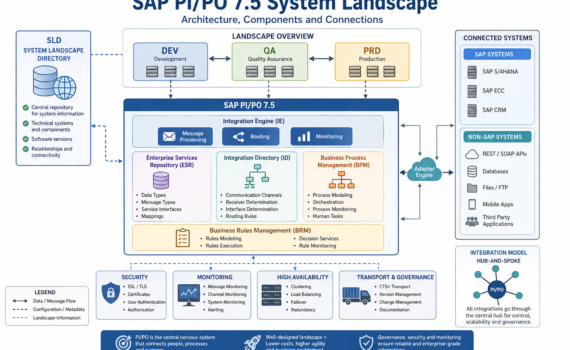
SAP PI/PO 7.5 System Landscape: architecture, components, and how to orchestrate it without breaking your operation
Category:Programming,SAP PI/POIntroduction: the “nervous system” of your digital enterprise
In any modern organization, systems don’t operate in isolation: ERP, CRM, e-commerce, banking, logistics, analytics—all need to communicate. SAP Process Orchestration acts as the central nervous system coordinating that communication.
From a business perspective: PI/PO is your integration hub.
From a technical perspective: it’s a service bus with capabilities for orchestration, routing, transformation, and governance.
From a practical perspective: it prevents a messy, unmaintainable point-to-point integration nightmare.
1) The map: what is the System Landscape?
The System Landscape is the official map of all systems involved in integration—who they are, how they connect, what roles they play, and which rules they follow.
Clear analogy: think of an airport network
- Each system = a city/airport
- PI/PO = the control tower + central hub
- Messages = flights
- SLD = the global aviation map
Without that map, there are no reliable routes—only chaos.
2) The core piece: SLD (System Landscape Directory)
System Landscape Directory is the central repository of technical information about all connected systems.
What does the SLD store?
- Technical systems (ECC, S/4, CRM, external systems)
- Software versions
- Integration components
- Relationships between systems
Analogy
The SLD is like a digital land registry:
it knows what exists, where it is, and how it connects.
Real impact
If your SLD is poorly maintained:
- Interfaces fail
- Transports break
- Routing becomes inconsistent
Hard truth: most integration issues start with a neglected SLD.
3) Landscapes: DEV, QA, PRD
A professional landscape is split into:
- DEV (Development): where you build
- QA (Quality): where you test
- PRD (Production): where business runs
Analogy
Building a car:
- DEV = design
- QA = crash testing
- PRD = real road
Best practice
Never develop in production. That’s not agility—it’s operational risk.
4) Core components of the Landscape
4.1 Integration Engine (IE)
The message execution engine
Function:
- Receives messages
- Applies rules
- Routes them
Analogy: the instinctive brain—fast decisions, direct action
4.2 Adapter Engine (AE)
Where all connectivity adapters live (REST, SOAP, IDoc, JDBC, File, etc.)
Function:
- Connect SAP to external systems
Analogy: the USB ports of your integration platform
4.3 Enterprise Services Repository (ESR)
Repository of integration design objects:
- Data Types
- Message Types
- Service Interfaces
- Mappings
Analogy: the architectural blueprint of a city
4.4 Integration Directory (ID)
Runtime configuration:
- Communication channels
- Receiver determination
- Routing logic
Analogy: a real-time GPS system
4.5 BPM (Business Process Management)
Handles complex process orchestration:
- Sequences
- Decisions
- State handling
Analogy: an orchestra conductor
4.6 BRM (Business Rules Management)
Manages dynamic business rules
Analogy: the rulebook of the business
5) Types of systems in the Landscape
SAP systems
- ECC
- S/4HANA
- CRM
Non-SAP systems
- REST APIs
- Databases
- Mobile apps
Analogy
Think of a football team:
- SAP = experienced core players
- Non-SAP = external talent
PI/PO ensures they all play under the same strategy.
6) Communication types
Synchronous
- Immediate response
- Example: REST API
Asynchronous
- Delayed processing
- Example: IDoc
Analogy
- Synchronous = phone call
- Asynchronous = email
7) Integration models
Point-to-point (anti-pattern)
Each system connects directly to others
Result: exponential complexity
Hub-and-Spoke (PI/PO)
Everything goes through a central hub
Result: control and scalability
Hard truth: if you have more than 10 point-to-point integrations, you already have technical debt.
8) Transport and governance
Objects move between systems using:
- CTS+
- File-based transport
Analogy
Like moving containers between ports
Risk
Without governance:
- Version inconsistencies
- Production failures
9) Security in the Landscape
- SSL
- OAuth
- Certificates
- Basic authentication
Analogy
Your system’s border control
10) Monitoring and operations
Tools:
- Message Monitoring
- Channel Monitoring
- Component Monitoring
Analogy
The air traffic control center
11) Scalability and high availability
- Clustering
- Load balancing
- Failover
Analogy
An airport with multiple runways
12) Best practices (no sugarcoating)
- Keep your SLD clean
- Version everything
- Avoid unnecessary complexity in mappings
- Document as if you’re leaving tomorrow
13) Common mistakes
- Outdated SLD
- Overuse of BPM
- Overcomplicated mappings
- Lack of monitoring
14) The future of the Landscape
While PI/PO remains relevant, the roadmap clearly points to:
SAP Integration Suite
Paradigm shift
- On-premise → Cloud
- Monolithic → Modular
- Transport-based → DevOps-driven
15) Strategic conclusion
The System Landscape is not just technical—it’s a strategic asset.
Well-designed:
- Reduces costs
- Increases speed
- Enables scalability
Poorly designed:
- Turns your architecture into a bottleneck