Category Archives: SAP PI/PO

  • 0

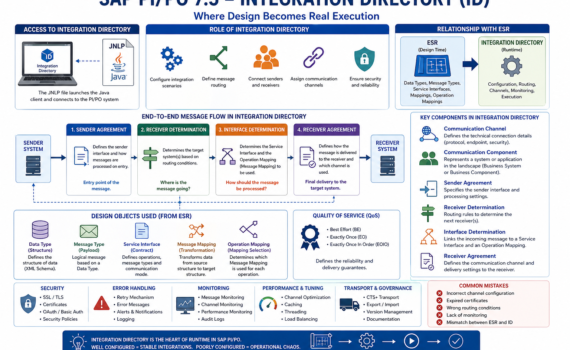
Integration Directory in SAP Process Orchestration: where design turns into real execution

Category:Programming,SAP,SAP PI/PO Tags : 

Hard truth (business-first, no fluff)

You can have a perfect design in ESR… but if your Integration Directory (ID) is poorly configured, nothing works. The ID is not a “nice-to-have”; it’s the operational core where decisions are made about who talks to whom, through which channel, and under what rules. This is where integration stability is either built—or destroyed.


1) What is the Integration Directory?

The Integration Directory (ID) is the PI/PO component responsible for runtime configuration of integrations.

If ESR is design, ID is live execution.

Executive analogy

  • ESR = architectural blueprint
  • ID = construction site
  • Runtime = building in operation

2) Accessing the Integration Directory: JNLP

Like ESR, the ID is accessed via a Java-based client using a JNLP (Java Network Launch Protocol) file.

What does JNLP do?

  • Launches the configuration client
  • Connects to the PI/PO system
  • Loads configuration objects

Analogy

JNLP is the remote control for operating your integration system.

Operational reality

  • Java dependency
  • Security and compatibility challenges
  • Certificate configuration requirements

Practical insight: many connection issues are not SAP problems—they are Java issues.


3) Role of the Integration Directory in the architecture

The ID is responsible for:

  • Configuring integration scenarios
  • Defining message routing
  • Connecting senders and receivers
  • Assigning communication channels

Analogy

The ID is the logistics control center of your enterprise.


4) Key components of the Integration Directory

4.1 Communication Channel

Defines how systems connect.

Types

  • REST
  • SOAP
  • IDoc
  • File
  • JDBC

Elements

  • Protocol
  • Endpoint
  • Security

Analogy

It’s the network cable through which messages travel.


4.2 Communication Component

Represents a system in the landscape.

Types

  • Business System
  • Business Component

Analogy

It’s an actor in the integration ecosystem.


4.3 Sender Agreement

Defines:

  • Which interface sends the message
  • How it is processed on entry

Analogy

It’s the airport check-in counter.


4.4 Receiver Determination

Defines the target system(s) for the message.

Logic

  • Condition-based
  • Can be multiple receivers

Analogy

It’s the GPS deciding the destination.


4.5 Interface Determination

Defines:

  • Which Service Interface to use
  • Which mapping to apply

Analogy

It’s the instruction manual.


4.6 Receiver Agreement

Defines:

  • How the message is delivered
  • Which channel is used

Analogy

It’s the last-mile delivery logistics.


5) Full message flow

  1. Sender Agreement receives the message
  2. Receiver Determination selects destination
  3. Interface Determination defines transformation
  4. Receiver Agreement delivers the message

Analogy

Like shipping a package:

  • Intake → sorting → transformation → delivery

6) Relationship with ESR

The ID consumes design objects from ESR:

  • Data Types
  • Message Types
  • Service Interfaces
  • Message Mappings
  • Operation Mappings

Analogy

ESR = factory
ID = distribution


7) Data Type and Message Type at runtime

Although designed in ESR, they impact runtime behavior.

Function

  • Message validation
  • Payload structure

Analogy

They are the standard packaging format.


8) Service Interface in ID

Defines which operation is executed.

Types

  • Synchronous
  • Asynchronous

Impact

Determines message behavior.


9) Message Mapping execution

The ID uses mappings defined in ESR.

Function

Transforms data before delivery.

Analogy

It’s the real-time translator.


10) Operation Mapping

Defines which mapping is applied.

Usage

Configured in Interface Determination.

Analogy

It’s the strategy selector.


11) Advanced routing

Conditions

  • XPath
  • Context variables

Example

Route high-value orders to a different system.


12) Quality of Service (QoS)

Types

  • Best Effort
  • Exactly Once (EO)
  • Exactly Once In Order (EOIO)

Analogy

It’s the delivery guarantee level.


13) Error handling

Strategies

  • Retries
  • Alerts
  • Logging

Analogy

It’s the contingency plan.


14) Security in Integration Directory

  • SSL
  • Certificates
  • OAuth
  • Basic authentication

Analogy

It’s your system’s digital customs control.


15) Monitoring

Tools:

  • Message Monitoring
  • Channel Monitoring

Analogy

The operations control center.


16) Performance tuning

Best practices

  • Avoid unnecessary mappings
  • Use caching
  • Optimize channels

17) Transport across environments

ID configurations are transported using:

  • CTS+
  • Export/Import

Risk

Misalignment between ESR and ID.


18) Governance

Key rules

  • Consistent naming
  • Versioning
  • Documentation

19) Common mistakes

  • Misconfigured channels
  • Expired certificates
  • Lack of monitoring
  • Incorrect routing

20) Evolution toward the cloud

The future points to:
SAP Integration Suite

Key shift

  • Web-based configuration
  • API-first approach
  • Event-driven architectures

21) Strategic conclusion

The Integration Directory is where:

  • Design becomes business value
  • Integrations come to life

Well configured:

  • Stability
  • Scalability
  • Control

Poorly configured:

  • Operational chaos
  • 0

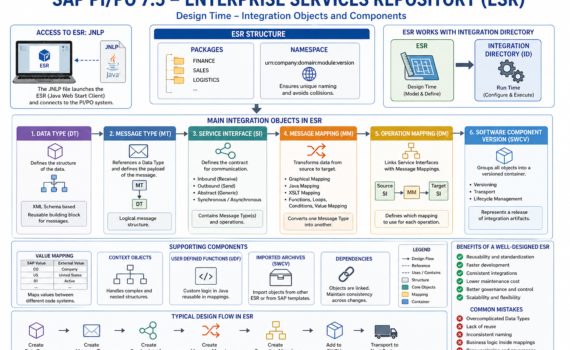
Enterprise Services Repository (ESR) in SAP Process Orchestration: designing integrations that scale (instead of collapsing)

Category:Programming,SAP,SAP PI/PO Tags : 

Hard truth (no sugarcoating)

If your ESR design layer is messy, your operations will pay the price: unmaintainable mappings, hidden dependencies, and exploding delivery times. The ESR is not just another repository; it is your integration contract factory. Either you govern it with discipline… or it governs you.


1) What is the Enterprise Services Repository (ESR)?

The ESR is the repository where all integration artifacts are modeled: data structures, service contracts, and transformations. It is the single source of truth for design.

Executive analogy:
ESR is like the architecture department of a construction company. If the blueprint is wrong, the building collapses—even if execution is flawless.


2) Why ESR matters to the business

  • Reduces time-to-market (object reuse)
  • Avoids technical debt (clear contracts)
  • Increases governance (versioning and traceability)
  • Enables scalable integrations

Key KPI: reuse rate of Data Types and Service Interfaces.
If you’re below 40%, you’re reinventing the wheel.


3) Accessing ESR: the infamous JNLP

The traditional ESR is accessed via a Java Web Start client using a JNLP (Java Network Launch Protocol) file.

What is JNLP?

A file that:

  • Defines the server URL
  • Specifies the client to launch
  • Opens the design tool

Analogy:
JNLP is the master key to your integration factory.

Modern considerations

  • Java dependency (security/compatibility issues)
  • Local configuration requirements (certificates, proxy)
  • Shift toward web-based tools (but ESR is still widely used)

4) ESR structure: packages and namespaces

Packages

Group objects by functional domain:

  • FINANCE
  • SALES
  • LOGISTICS

Namespaces

Ensure unique naming across the system.

Analogy:
Packages = folders
Namespace = internet domain (prevents collisions)

Best practice:
Use consistent naming:
urn:company:domain:module:version


5) Data Type (DT): the foundation of everything

The Data Type defines the data structure (fields, hierarchies, types).

Characteristics

  • Based on XML Schema
  • Supports complex structures
  • Reusable

Analogy

A Data Type is the product mold.

Best practices

  • Avoid redundancy
  • Design granular structures
  • Version properly

6) Message Type (MT): the message wrapper

The Message Type references a Data Type.

Function

Defines the logical payload of the message.

Analogy

If the Data Type is the mold, the Message Type is the packaged product ready to ship.


7) Service Interface (SI): the contract

Defines how systems communicate.

Types

  • Outbound (sending)
  • Inbound (receiving)
  • Abstract (generic)

Elements

  • Message Types
  • Mode (synchronous/asynchronous)

Analogy

A legal contract: defines what is sent, how, and when.

Hard truth:
If your interfaces are poorly designed, the issue is not technical—it’s business design.


8) Message Mapping: transformation layer

The Message Mapping converts an input message into an output message.

Tools

  • Graphical Mapping
  • Java Mapping
  • XSLT

Common functions

  • Concatenation
  • Conditions
  • Loops
  • Value Mapping

Analogy

It’s the assembly line where raw material becomes the final product.

Anti-patterns

  • Embedding complex business logic in mappings
  • Creating massive, hard-to-maintain mappings

9) Operation Mapping: transformation orchestration

The Operation Mapping connects:

  • Service Interfaces
  • Message Mappings

Function

Defines which mapping is used for each operation.

Analogy

A workflow manager deciding which transformation applies.


10) Software Component Version (SWCV)

Objects are grouped inside a:

  • Software Component Version (SWCV)

Function

  • Groups artifacts
  • Enables versioning
  • Supports transport

Analogy

A software release package.


11) Value Mapping

Maps values between systems.

Example:

  • SAP: “CO”
  • External: “Company”

Analogy

A bilingual dictionary.


12) Context objects and advanced mapping

Context handling

Manages complex hierarchies.

UDF (User Defined Functions)

Custom Java logic.

Analogy

Custom code embedded into the production line.


13) Reusability: the holy grail

What to reuse

  • Data Types
  • Message Types
  • Mappings

Benefits

  • Fewer errors
  • Lower cost
  • Faster delivery

Maturity indicator:
A mature landscape reuses over 60% of its artifacts.


14) Versioning and governance

Strategies

  • Namespace-based versioning
  • Maintain backward compatibility

Risks

  • Breaking existing integrations
  • Hidden dependencies

15) Transport across environments

ESR objects are transported via:

  • CTS+
  • Export/Import

Analogy

Moving blueprints between engineering offices.


16) Integration with Integration Directory

ESR defines the design.
Integration Directory defines runtime behavior.

Analogy

  • ESR = blueprint
  • ID = construction execution

17) Performance and optimization

Best practices

  • Avoid unnecessary mappings
  • Use XSLT for high-volume scenarios
  • Minimize heavy UDF usage

18) Security in ESR

  • Role-based access
  • Authorization control
  • Audit capabilities

19) Common mistakes

  • Overengineering structures
  • Lack of reuse
  • Inconsistent naming
  • Business logic embedded in mappings

20) Evolution and future

While ESR is still relevant, the future is moving toward:
SAP Integration Suite

Key shift

  • On-premise → Cloud
  • Heavy design → Lightweight APIs
  • Transport-based → DevOps-driven

21) Strategic conclusion

The ESR is not just a technical tool—it’s a strategic integration asset.

Well-managed:

  • Accelerates delivery
  • Reduces costs
  • Scales efficiently

Poorly managed:

  • Creates exponential technical debt

  • 0

SAP PI/PO 7.5 System Landscape: architecture, components, and how to orchestrate it without breaking your operation

Category:Programming,SAP PI/PO Tags : 

Introduction: the “nervous system” of your digital enterprise

In any modern organization, systems don’t operate in isolation: ERP, CRM, e-commerce, banking, logistics, analytics—all need to communicate. SAP Process Orchestration acts as the central nervous system coordinating that communication.

From a business perspective: PI/PO is your integration hub.
From a technical perspective: it’s a service bus with capabilities for orchestration, routing, transformation, and governance.
From a practical perspective: it prevents a messy, unmaintainable point-to-point integration nightmare.


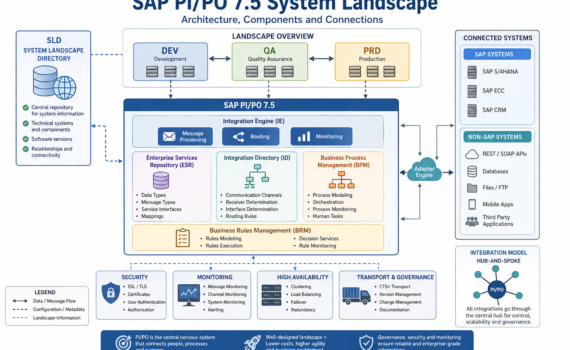
1) The map: what is the System Landscape?

The System Landscape is the official map of all systems involved in integration—who they are, how they connect, what roles they play, and which rules they follow.

Clear analogy: think of an airport network

  • Each system = a city/airport
  • PI/PO = the control tower + central hub
  • Messages = flights
  • SLD = the global aviation map

Without that map, there are no reliable routes—only chaos.


2) The core piece: SLD (System Landscape Directory)

System Landscape Directory is the central repository of technical information about all connected systems.

What does the SLD store?

  • Technical systems (ECC, S/4, CRM, external systems)
  • Software versions
  • Integration components
  • Relationships between systems

Analogy

The SLD is like a digital land registry:
it knows what exists, where it is, and how it connects.

Real impact

If your SLD is poorly maintained:

  • Interfaces fail
  • Transports break
  • Routing becomes inconsistent

Hard truth: most integration issues start with a neglected SLD.


3) Landscapes: DEV, QA, PRD

A professional landscape is split into:

  • DEV (Development): where you build
  • QA (Quality): where you test
  • PRD (Production): where business runs

Analogy

Building a car:

  • DEV = design
  • QA = crash testing
  • PRD = real road

Best practice

Never develop in production. That’s not agility—it’s operational risk.


4) Core components of the Landscape

4.1 Integration Engine (IE)

The message execution engine

Function:

  • Receives messages
  • Applies rules
  • Routes them

Analogy: the instinctive brain—fast decisions, direct action


4.2 Adapter Engine (AE)

Where all connectivity adapters live (REST, SOAP, IDoc, JDBC, File, etc.)

Function:

  • Connect SAP to external systems

Analogy: the USB ports of your integration platform


4.3 Enterprise Services Repository (ESR)

Repository of integration design objects:

  • Data Types
  • Message Types
  • Service Interfaces
  • Mappings

Analogy: the architectural blueprint of a city


4.4 Integration Directory (ID)

Runtime configuration:

  • Communication channels
  • Receiver determination
  • Routing logic

Analogy: a real-time GPS system


4.5 BPM (Business Process Management)

Handles complex process orchestration:

  • Sequences
  • Decisions
  • State handling

Analogy: an orchestra conductor


4.6 BRM (Business Rules Management)

Manages dynamic business rules

Analogy: the rulebook of the business


5) Types of systems in the Landscape

SAP systems

  • ECC
  • S/4HANA
  • CRM

Non-SAP systems

  • REST APIs
  • Databases
  • Mobile apps

Analogy

Think of a football team:

  • SAP = experienced core players
  • Non-SAP = external talent

PI/PO ensures they all play under the same strategy.


6) Communication types

Synchronous

  • Immediate response
  • Example: REST API

Asynchronous

  • Delayed processing
  • Example: IDoc

Analogy

  • Synchronous = phone call
  • Asynchronous = email

7) Integration models

Point-to-point (anti-pattern)

Each system connects directly to others

Result: exponential complexity

Hub-and-Spoke (PI/PO)

Everything goes through a central hub

Result: control and scalability

Hard truth: if you have more than 10 point-to-point integrations, you already have technical debt.


8) Transport and governance

Objects move between systems using:

  • CTS+
  • File-based transport

Analogy

Like moving containers between ports

Risk

Without governance:

  • Version inconsistencies
  • Production failures

9) Security in the Landscape

  • SSL
  • OAuth
  • Certificates
  • Basic authentication

Analogy

Your system’s border control


10) Monitoring and operations

Tools:

  • Message Monitoring
  • Channel Monitoring
  • Component Monitoring

Analogy

The air traffic control center


11) Scalability and high availability

  • Clustering
  • Load balancing
  • Failover

Analogy

An airport with multiple runways


12) Best practices (no sugarcoating)

  • Keep your SLD clean
  • Version everything
  • Avoid unnecessary complexity in mappings
  • Document as if you’re leaving tomorrow

13) Common mistakes

  • Outdated SLD
  • Overuse of BPM
  • Overcomplicated mappings
  • Lack of monitoring

14) The future of the Landscape

While PI/PO remains relevant, the roadmap clearly points to:
SAP Integration Suite

Paradigm shift

  • On-premise → Cloud
  • Monolithic → Modular
  • Transport-based → DevOps-driven

15) Strategic conclusion

The System Landscape is not just technical—it’s a strategic asset.

Well-designed:

  • Reduces costs
  • Increases speed
  • Enables scalability

Poorly designed:

  • Turns your architecture into a bottleneck

  • 0

How to connect SAP PO running over netweaver 7.50 with OpenText XML Adapter

Category:Programming,SAP,SAP PI/PO Tags : 

Introduction

In today’s digital landscape, enterprises rely heavily on seamless integration between platforms to maintain agility, optimize operations, and enhance digital transformation initiatives. SAP Process Orchestration (SAP PO) is a comprehensive integration software that enables the synchronization of processes and data across numerous SAP and non-SAP applications. One such integration possibility involves connecting SAP PO with OpenText’s SOAP API to facilitate efficient document management capabilities.

OpenText is a leading enterprise information management company known for its robust solutions, including its SOAP API which provides functionalities for document management. Integrating SAP PO with OpenText’s SOAP API allows organizations to achieve a streamlined connection between their business processes and their document management systems, thereby enhancing access to vital information and documents.

Before embarking on this integration journey, several key considerations must be addressed, including authentication mechanisms, message format mapping, and error handling. Given that SOAP (Simple Object Access Protocol) relies on XML-based messaging protocols, mastering these elements is critical for a successful and secure integration. This article will guide you through the essential steps for establish a secure connection to OpenText’s SOAP API and offer insights into how to authenticate users and manage documents effectively.

Goal

The goal of this article is to guide enterprises on connecting a legacy system to OpenText using SAP PO, and to generate a single endpoint that encapsulates multiple requests to different services exposed by OpenText. By achieving this, organizations can streamline their document management processes, reduce complexity, and enhance the efficiency of their operations.

The first step in order to achieve the integration of both systems will be to Establishing a secure and reliable connection between SAP PO and OpenText’s SOAP API requires robust authentication mechanisms.

In this case we will delve into the basic authentication. Understanding this methodology is crucial for safeguarding your data and ensuring authorized access only.

iFlow_AuthenticateUser.png

Once authenticated, the core of the integration lies in the consumption of document management features offered by the OpenText SOAP API. This section offers a step-by-step guide on how to configure SAP PO to interact with OpenText’s document management functionalities.

To simplify, the basic architecture will be structured this way.

iFlow_DocumentManagement.png

A single interface is presented to the legacy system, which is then divided within SAP PI to engage multiple interfaces based on a custom tag referred to as method.

iFlow_InterfaceSplit.png

Step 1.

Generate a single data type with a common structure for the services that will be consolidated on one.

The following Data Type will be used as the request

Captura de pantalla 2024-09-26 183556 - Edited.png

And this Data Type will be used for the response

DT_OpenText_Response.png

Transformation process involve several use of graphical mapping and XSLT transformations in order to achieve the goal to get a single entry point for all the exposed services, with the graphical mappings allowing to include transformations and validations in order to detect the data type received 

Step 2 

Define the graphical message mappings for request and response, one for each inbound service interface defined.

Captura de pantalla 2024-09-26 183908 - Edited.png
Captura de pantalla 2024-09-26 183950 - Edited.png

Step 3

At the response graphical mapping, add custom java functions in order to identify and set the data type of the values that are returning, the custom functions must to be embedded inside the mapping and be called as custom functions.

This custom function receive 5 entry parameters that are returned by the opentext get node method, evaluate the data type of the value and return a single text with the description of the type, the goal of this is reduce the complexity of the logic at the legacy system.

Captura de pantalla 2024-09-26 184244 - Edited.png

Here is the Java code of the custom function

Captura de pantalla 2024-09-26 184029 - Edited.png

at also another custom function was developed to validate the data type of any value returned at the Values tag

Captura de pantalla 2024-09-26 184305 - Edited.png
Captura de pantalla 2024-09-26 184215 - Edited.png

Step 4

Build the XSLT transformations in order to adapt the structure to the opentext services, this will add the corresponding namespaces, eliminate non necessary tags and generate the parents when will be need it.

Captura de pantalla 2024-09-26 183722 - Edited.png
Captura de pantalla 2024-09-26 183747 - Edited.png
Captura de pantalla 2024-09-26 183807.png

Step 5.

Build the operation mapping that will be in charge of call sequentially the graphical message mapping and the XSLT transformations, this operation mapping will have one step for request and another for response considering the process defined as Synchronous.

Request side will at first call the graphical mapping and at second will use the XSLT transformation

Captura de pantalla 2024-09-26 184651 - Edited.png

The response side will call the XSLT transformation that will adapt the structure, then add the namespace and at last use the graphical mapping where the custom java functions are located

Captura de pantalla 2024-09-26 184711 - Edited.png

Once all the steps are done and the iFlow is created and deployed the service could be tested using SOAP UI.

Conclusion

This approach allow to generate a single endpoint to consume some specific methods of the Opentext implementation, allowing to get an homogeneous structure at response, but will require some work if new methods will be implemented, at also the architecture could be considered slightly coupled since maintenance could be required as well but not frequently.

The current architecture could face several challenges to be migrated to SAP Integration Suite running over BTP

Published at https://community.sap.com/t5/technology-blog-posts-by-members/how-to-connect-sap-po-running-over-netweaver-7-50-with-opentext-xml-adapter/ba-p/14177781


  • 0

Monitoring Messages and Communication Channels in SAP PO

Category:Programming,SAP,SAP PI/PO Tags : 

Introduction

Monitoring the heartbeat of your SAP PO system is essential for ensuring seamless data flow and business operations. Effective message and communication channel monitoring provides valuable insights into the health and performance of your integration processes.

In this guide, we’ll delve into the intricacies of monitoring messages and communication channels within SAP PO. We’ll explore the key tools and techniques available to track the status of your channels, analyze message processing, and proactively identify potential issues. By following the steps outlined here, you can establish a robust monitoring strategy to maintain the optimal performance of your SAP PO environment.

Maintaining smooth information flow is crucial in SAP Process Orchestration (PO). Here’s a detailed guide on monitoring messages and communication channels within SAP PO:

1. Communication Channel Monitoring

  • This provides a real-time overview of your communication channels and their adapters.
  • Access:
    • Open a web browser and navigate to: http://<host>:<port>/pimon (Replace <host> and <port> with your server details).
    • Go to Monitoring -> Adapter Engine -> Communication Channel Monitor.
  • The monitor displays a list of channels with details like:
    • Channel Name
    • Adapter Type (e.g., File, SOAP)
    • Status (e.g., Running, Stopped, Error)
    • Messages Processed
  • Double-clicking a channel provides further details and lets you:
    • Analyze processing details (for troubleshooting)
    • Restart or stop the channel (if needed)

2. Message Monitoring

  • This helps track the processing status of individual messages within your SAP PO system.
  • Access:
    • In Integration Builder, navigate to Runtime Workbench -> Component Monitoring -> Display.
    • Select Adapter Engine from the list.
  • The monitor displays a list of messages with details like:
    • Interface Name
    • Sender/Receiver Parties
    • Processing Status (e.g., Success, Error)
    • Timestamps (sent/received)
  • You can filter messages based on various criteria for focused analysis.

3. Additional Monitoring Options

  • Alert Configuration:
    • SAP PO allows setting up alerts to notify you of specific events (e.g., channel errors, message failures).
    • This proactive approach helps identify issues promptly.
  • Log Viewer:
    • The SAP PO system generates logs for various activities.
    • Accessing the log viewer allows you to analyze detailed information about message processing and potential errors.

4. Important Points

  • The Communication Channel Monitor reflects the current state of channels.
  • For historical message data, use the Message Monitor and filter by the relevant interface.
  • Consider activating additional logging for specific adapters (like File Adapter) to gain deeper insights during troubleshooting.

5. Resources

By effectively utilizing these monitoring tools, you can ensure the smooth operation of your communication channels and proactively address any message processing issues within your SAP PO environment.


  • 0

Enhancing Integration Performance with Asynchronous Communication

Category:Programming,SAP,SAP PI/PO Tags : 

Asynchronous communication, where messages are sent without immediate acknowledgment, can significantly improve the performance and scalability of integration processes. This approach allows for non-blocking operations, reduced latency, and increased throughput, making it a valuable tool for modern integration architectures.

Understanding Asynchronous Communication

In asynchronous communication, messages are sent to a queue or message broker, where they are stored until the recipient is ready to process them. This decoupling of the sender and receiver allows for greater flexibility and scalability.

Key Benefits of Asynchronous Communication

  • Improved Performance: Asynchronous communication eliminates the need for synchronous waits, reducing latency and improving overall system performance.
  • Increased Scalability: Asynchronous systems can handle higher message volumes without sacrificing performance, making them ideal for large-scale integrations.
  • Enhanced Reliability: Asynchronous communication can provide fault tolerance by allowing messages to be retried if processing fails.
  • Better Resource Utilization: Asynchronous systems can optimize resource usage by allowing multiple processes to handle messages concurrently.

Implementing Asynchronous Communication

To implement asynchronous communication in integration processes, consider the following approaches:

  1. Message Queues: Use a message queue system like RabbitMQ, Apache Kafka, or AWS SQS to store and deliver messages.
  2. Event-Driven Architecture: Design your integration using an event-driven architecture, where events trigger actions or workflows.
  3. Asynchronous APIs: If your integration involves APIs, ensure they support asynchronous communication or implement asynchronous wrappers.

Best Practices for Asynchronous Communication

  • Choose the right message queue: Select a message queue system that aligns with your specific requirements, such as scalability, reliability, and performance.
  • Implement error handling: Implement robust error handling mechanisms to ensure that messages are processed correctly and any failures are addressed.
  • Optimize message size: Keep message sizes as small as possible to reduce network traffic and improve performance.
  • Consider message durability: Determine the appropriate level of message durability based on your business requirements.
  • Monitor and tune: Regularly monitor your asynchronous communication system to identify performance bottlenecks and make necessary adjustments.

Case Study: Improving Order Processing with Asynchronous Communication

A large e-commerce company was experiencing performance issues with its order processing system. By switching to an asynchronous architecture, they were able to:

  • Reduce order processing time by 50%
  • Increase system scalability to handle peak demand
  • Improve reliability by reducing the impact of system failures

Conclusion

Asynchronous communication is a powerful tool for enhancing integration performance and scalability. By understanding its benefits and best practices, organizations can build more efficient and resilient integration systems that meet the demands of modern business requirements.


  • 0

A Deep Dive into PASS, SAAS, and IAAS

Category:Programming,SAP,SAP PI/PO

Understanding the Cloud Landscape: PASS, SAAS, and IAAS

The cloud computing landscape has evolved significantly over the years, offering businesses a wide range of services to meet their IT needs. Three key models have emerged as the foundation of cloud computing: Platform as a Service (PaaS), Software as a Service (SaaS), and Infrastructure as a Service (IaaS). Let’s explore each of these models in detail.

1. Software as a Service (SaaS)

  • Definition: SaaS is a cloud computing model where a third-party provider delivers software applications over the internet. Users access these applications through a web browser or mobile app, without the need to install or maintain any software on their devices.
  • Examples: Salesforce, Microsoft 365, Google Workspace, Dropbox, Zoom
  • Benefits:
    • Reduced upfront costs
    • Scalability
    • Automatic updates
    • Accessibility from anywhere
  • Disadvantages:
    • Limited customization
    • Vendor lock-in
    • Potential security concerns

2. Platform as a Service (PaaS)

  • Definition: PaaS provides a cloud-based platform for developers to build, run, and manage applications. It includes tools and services such as databases, operating systems, programming languages, and web servers.
  • Examples: Heroku, AWS Elastic Beanstalk, Google App Engine, Azure App Service
  • Benefits:
    • Faster development and deployment
    • Focus on core business logic
    • Reduced infrastructure management
    • Scalability
  • Disadvantages:
    • Limited control over underlying infrastructure
    • Potential vendor lock-in
    • Learning curve for new platforms

3. Infrastructure as a Service (IaaS)

  • Definition: IaaS provides fundamental computing resources, such as servers, storage, networking, and operating systems, as a service. Customers can rent these resources on a pay-as-you-go basis and customize them to their specific needs.
  • Examples: Amazon Web Services (AWS), Microsoft Azure, Google Cloud Platform (GCP)
  • Benefits:
    • Flexibility and control
    • Scalability
    • Cost-effectiveness
    • Reduced hardware and maintenance costs
  • Disadvantages:
    • Requires technical expertise
    • Ongoing management and maintenance
    • Potential security risks

Choosing the Right Model

The best cloud computing model for your business depends on various factors, including your IT needs, budget, technical expertise, and risk tolerance. Here are some considerations:

  • Complexity of your applications: SaaS is suitable for simpler applications, while PaaS and IaaS are better for more complex ones.
  • Level of control: IaaS offers the most control, while SaaS provides the least.
  • Budget: SaaS often has lower upfront costs, while IaaS can be more cost-effective in the long run.
  • Technical expertise: IaaS requires more technical expertise than SaaS or PaaS.

By understanding the differences between PASS, SAAS, and IAAS, you can make informed decisions about how to leverage cloud computing to drive your business forward.


  • 0

Consuming SAP Process Orchestration RESTful Web Services with Basic Authorization Using Java and Spring Framework

Category:Programming,SAP,SAP PI/PO

Introduction:

In modern enterprise application development, integrating with external services is a common requirement. SAP Process Orchestration (SAP PO) offers a robust platform for orchestrating business processes and integrating systems, including exposing RESTful web services. In this article, we will explore how to consume a RESTful web service exposed in SAP PO using Java and the Spring Framework, with basic authorization.

Assumptions:

Before we begin, let’s clarify some assumptions:

  1. You have a basic understanding of Java and the Spring Framework.
  2. You have access to an SAP Process Orchestration instance with a RESTful web service exposed.
  3. The SAP Process Orchestration RESTful web service requires basic authorization.

Execution:

To consume the SAP Process Orchestration RESTful web service, follow these steps:

  1. Set Up Your Project: Create a new Java project and add the required dependencies for the Spring Framework and Spring Boot. You can use Maven or Gradle for dependency management.
  2. Create a RestTemplate Bean: In your Spring configuration class, create a bean for RestTemplate. This bean will be used to make HTTP requests to the SAP PO RESTful web service.java

@Configuration public class AppConfig { @Bean public RestTemplate restTemplate() { return new RestTemplate(); } }

Consume the RESTful Web Service: In your main class or service class, use the RestTemplate bean to consume the SAP PO RESTful web service. Replace https://your-sap-po-url.com/api/resource with the actual URL of your SAP PO RESTful web service, and replace your-username and your-password with your SAP PO credentials.

java

public class Main {

public static void main(String[] args) {

String url = "https://your-sap-po-url.com/api/resource";

String username = "your-username";

String password = "your-password";

RestTemplate restTemplate = new RestTemplate();

HttpHeaders headers = new HttpHeaders();

headers.setBasicAuth(username, password);

HttpEntity<String> entity = new HttpEntity<>(headers);

try {

ResponseEntity<String> response = restTemplate.exchange(url, HttpMethod.GET,

entity, String.class);

if (response.getStatusCode() == HttpStatus.OK) {

System.out.println(response.getBody());

} else {

System.out.println("Failed to call the API. Status code: " +

response.getStatusCodeValue());

}

} catch (Exception e) {

System.out.println("An error occurred: " + e.getMessage());

}

}

}

  1. Run Your Application: Run your Java application. If everything is set up correctly, the application should make a GET request to the SAP PO RESTful web service and print the response body to the console.

Conclusion:

In this article, we have demonstrated how to consume a RESTful web service exposed in SAP Process Orchestration using Java and the Spring Framework, with basic authorization. By following the steps outlined in this article, you can integrate your Java applications with SAP PO and leverage its capabilities for business process orchestration and system integration.


  • 0

Streamlining Business Operations: Understanding SAP Process Orchestration

Category:Programming,SAP,SAP PI/PO Tags : 

Intro:

In the realm of modern enterprises, seamless operations and efficient workflows are pivotal for sustained success. SAP Process Orchestration (SAP PO) emerges as a robust solution, harmonizing diverse systems and facilitating streamlined processes. This article delves into the essence of SAP PO, elucidating its functionalities, and outlining its transformative impact on organizational workflows.

How SAP Process Orchestration Works:

At its core, SAP Process Orchestration is a comprehensive tool designed to integrate, streamline, and automate business processes across various systems. It unifies disparate applications and data sources, offering a centralized platform for orchestration, monitoring, and optimization. Leveraging a combination of process integration, business process management, and connectivity capabilities, SAP PO enables the seamless flow of information and activities within an organization. Its adaptability to diverse environments and capacity to synchronize operations across different departments make it an indispensable asset in today’s complex business landscape.

SAP Process Orchestration (SAP PO) comprises several key components that collectively enable the integration, orchestration, and optimization of business processes within an organization. These components work synergistically to streamline operations and enhance efficiency:

  1. Process Integration (PI): Formerly known as SAP NetWeaver PI, this component facilitates the seamless integration of disparate systems, applications, and data sources. It provides tools and capabilities to establish connections, transform data formats, and ensure smooth communication between various technologies.
  2. Business Process Management (BPM): BPM within SAP PO allows for the modeling, execution, and continuous improvement of business processes. It offers a graphical environment where processes can be designed, monitored, and optimized, enabling organizations to adapt quickly to changing business requirements.
  3. Business Rules Management (BRM): This component enables the management and application of business rules governing different aspects of operations. It allows for the creation, maintenance, and execution of rules that dictate how processes should behave under specific conditions.
  4. Enterprise Service Repository (ESR): ESR serves as a centralized repository for storing integration objects, service interfaces, mappings, and other artifacts essential for integration scenarios. It provides a structured environment for managing and reusing integration assets across the organization.
  5. Integration Builder: This tool within SAP PO assists in configuring and defining integration scenarios. It allows users to create, modify, and manage configurations for message processing, mappings, and connections between systems.
  6. Monitoring and Analytics: SAP PO offers comprehensive monitoring and analytics capabilities. It provides real-time insights into the performance of integrated processes, allowing for proactive identification and resolution of issues, as well as optimization of workflows.
  7. Adapter Framework: This framework supports connectivity to various systems and technologies, offering a wide range of adapters to facilitate communication with different applications, databases, and protocols.

These components collectively form a robust framework that empowers organizations to orchestrate, streamline, and automate their business processes, fostering agility, efficiency, and adaptability within the rapidly evolving business landscape.


  • 0

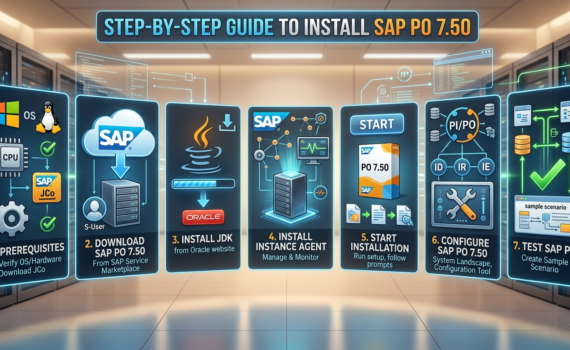
Step-by-Step Guide to Install SAP PO 7.50

Category:Programming,SAP,SAP PI/PO Tags : 

SAP PO (Process Orchestration) 7.50 is a powerful tool for managing and automating business processes. In this guide, we’ll walk you through the steps of installing SAP PO 7.50 on your system.

Step 1: Prerequisites

Before you begin the installation process, make sure that you meet the following prerequisites:

  • Operating System: SAP PO 7.50 is supported on various operating systems, including Windows, Linux, and AIX. You can check the supported operating systems for SAP PO 7.50 in the SAP Product Availability Matrix (PAM).
  • Hardware Requirements: Make sure that your system meets the minimum hardware requirements for SAP PO 7.50. You can find the hardware requirements in the SAP PO 7.50 installation guide.
  • SAP Java Connector (JCo): You’ll need to have the SAP Java Connector (JCo) installed on your system. You can download JCo from the SAP Service Marketplace.

Step 2: Download SAP PO 7.50

Next, you’ll need to download SAP PO 7.50. You can download SAP PO 7.50 from the SAP Service Marketplace. You’ll need to have an SAP Service Marketplace account to download the software.

Step 3: Install the Java Development Kit (JDK)

Before you install SAP PO 7.50, you’ll need to install the Java Development Kit (JDK) on your system. You can download the JDK from the Oracle website.

Step 4: Install the SAP Instance Agent

Once you’ve installed the JDK, you’ll need to install the SAP Instance Agent on your system. The SAP Instance Agent is used to manage and monitor the SAP PO 7.50 installation. You can download the SAP Instance Agent from the SAP Service Marketplace.

Step 5: Start the Installation

With the prerequisites and required software installed, you can now start the SAP PO 7.50 installation. To start the installation, run the SAP PO 7.50 installation file and follow the on-screen instructions. You’ll need to provide the necessary information, such as the installation directory, Java location, and so on.

Step 6: Configure SAP PO 7.50

Once the installation is complete, you’ll need to configure SAP PO 7.50. You’ll need to configure the SAP PO 7.50 system landscape, which includes the Integration Directory (ID), Integration Repository (IR), and Integration Engine (IE). You can configure the SAP PO 7.50 system landscape using the SAP PO 7.50 Configuration Tool.

Step 7: Test SAP PO 7.50

With SAP PO 7.50 installed and configured, you can now test the installation to make sure that everything is working as expected. You can test SAP PO 7.50 by creating a sample scenario and testing it in the SAP PO 7.50 system.

Conclusion

Installing SAP PO 7.50 is a straightforward process, but it requires some preparation and planning. By following the steps in this guide, you can successfully install SAP PO 7.50 on your system and start automating and managing your business processes.

Next: SAP PI/PO 7.5 System Landscape: architecture, components, and how to orchestrate it without breaking your operation


Archives

Categories