

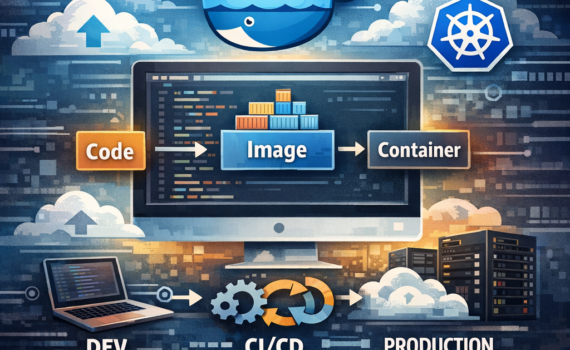
Docker: What It Is, Requirements, Use Cases, and How It Transforms Modern Development
Category:Programming1. Introduction: The Problem Docker Came to Solve
For years, software development had a silent enemy: environment inconsistency.
- “It works on my machine”
- Differences between dev, QA, and production
- Incompatible dependencies
- Error-prone manual configurations
This chaos resulted in:
- Deployment delays
- Hard-to-reproduce bugs
- High operational costs
- Friction between teams
Docker emerged as a direct response to this problem. It’s not just a tool—it’s an operational model.
2. What Is Docker?
Docker is a platform that allows you to build, package, and run applications inside containers.
Simple (but powerful) definition:
Docker encapsulates your application + dependencies + environment into a portable unit called a container.
What is a container?
A container is:
- Lightweight
- Isolated
- Reproducible
- Portable
Unlike virtual machines (VMs), containers don’t require a full operating system, making them far more efficient.
3. Docker vs Virtual Machines
| Feature | Docker (Containers) | Virtual Machines |
|---|---|---|
| Size | Lightweight (MBs) | Heavy (GBs) |
| Startup time | Seconds | Minutes |
| Resource usage | Low | High |
| Portability | High | Medium |
| Isolation | Process-level | Full OS |
👉 Business translation: Docker reduces infrastructure costs and accelerates time-to-market.
4. Docker Architecture
Docker is more than a command—it has a structured architecture:
Core components:
1. Docker Engine
The core runtime. Includes:
- Docker Daemon (dockerd)
- Docker CLI
- REST API
2. Images
Immutable templates containing:
- Code
- Libraries
- Configuration
3. Containers
Running instances of images.
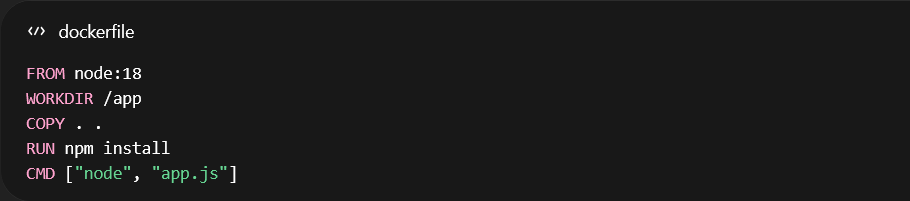
4. Dockerfile
A file that defines how to build an image.
Example:
5. Docker Hub (or registry)
A repository for storing and distributing images.
5. Requirements to Use Docker
5.1 Hardware Requirements
- CPU: 64-bit (virtualization enabled)
- RAM: Minimum 4GB (8GB recommended)
- Disk: SSD preferred
5.2 Software Requirements
On Windows:
- Windows 10/11 Pro (WSL2 enabled)
- Docker Desktop
On Linux:
- Kernel 3.10+
- Docker Engine
On macOS:
- Docker Desktop
6. Key Concepts You Must Master
6.1 Image vs Container
- Image = template
- Container = execution
👉 Analogy: image is the recipe, container is the final dish.
6.2 Volumes
Used to persist data outside containers.

6.3 Networking
Docker supports:
- Container-to-container communication
- Network isolation
- Microservices connectivity
6.4 Docker Compose
Used to orchestrate multiple containers.
Example:
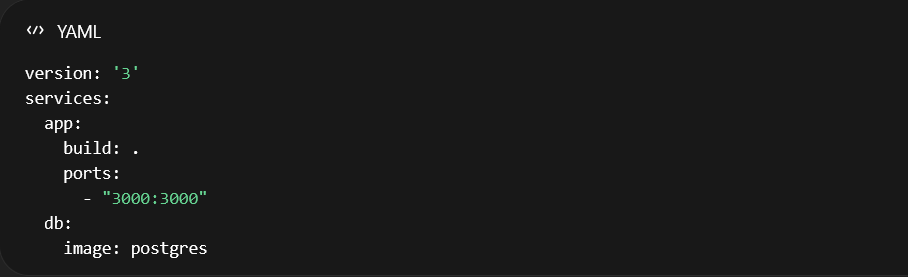
👉 Translation: you spin up an entire system with a single command.
7. What Is Docker Used For?
This is where the ROI becomes obvious.
7.1 Software Development
- Consistent environments
- Fast setup
- No dependency conflicts
7.2 Microservices
Docker is the de facto standard.
- One service per container
- Independent scaling
- Decoupled deployments
7.3 CI/CD Pipelines
Docker enables:
- Reproducible builds
- Reliable testing environments
- Automated deployments
7.4 Cloud and DevOps
Docker is foundational for:
- Kubernetes
- AWS ECS
- Azure Container Apps
7.5 Data Engineering
- Reproducible pipelines
- Isolated ML environments
- Integration with tools like Spark
8. Strategic Advantages of Docker
8.1 Full Portability
“Build once, run anywhere”
8.2 Consistency
Eliminates:
“it works in dev but not in production”
8.3 Scalability
Containers can be replicated instantly.
8.4 Resource Efficiency
Lower consumption vs VMs → direct cloud savings.
8.5 Isolation
Each container runs independently.
8.6 Deployment Speed
Deploy in seconds.
8.7 Team Productivity
- Fewer environment bugs
- Faster onboarding
- More focus on business logic
9. Disadvantages (No hype, just reality)
9.1 Learning Curve
Docker is not trivial at first.
9.2 Security Concerns
- Shared kernel
- Requires best practices
9.3 Production Complexity
At scale:
- Orchestration (Kubernetes)
- Complex networking
- Observability challenges
10. Docker in Modern Architectures
Docker is foundational for:
10.1 Microservices
Each service encapsulated.
10.2 Serverless Containers
Example: AWS Fargate
10.3 Event-Driven Systems
Integrated with queues and streams.
11. Typical Docker Workflow
- Write your application
- Create a Dockerfile
- Build the image

4. Run the container

- Push to registry
- Deploy to cloud
12. Real-World Use Cases
Case 1: SaaS Startup
- Fast deployment
- Horizontal scaling
Case 2: Enterprise Integration (e.g., SAP environments)
- Node/Java microservices
- Integration with cloud platforms
- Service isolation
Case 3: Trading / Data Pipelines
- Reproducible backtesting
- Controlled environments
13. Best Practices
13.1 Use Lightweight Images
- Alpine-based images
- Reduce layers
13.2 Avoid Running as Root
Basic security hygiene.
13.3 Use Environment Variables
Avoid hardcoding configs.
13.4 Version Your Images
Always use tags.
13.5 Centralize Logs
For observability and debugging.
14. Docker + Kubernetes: The Next Level
Docker builds containers.
Kubernetes orchestrates them.
👉 Executive translation:
- Docker = packaging unit
- Kubernetes = production operating system
15. Future Trends
- Serverless containers
- Edge computing
- On-demand dev environments
- AI pipelines in containers
Docker is not going away—it’s evolving.
Conclusion
Docker is no longer optional—it’s a strategic infrastructure layer that:
- Reduces friction
- Accelerates deployments
- Improves quality
- Enables scalability
If you don’t master it, you’re competing at a disadvantage.