Tag Archives: Scalability

  • 0

Build a Team That Elevates Your Business: The Systems and Principles to Scale Without Relying on You

Category:Business Management Tags : 

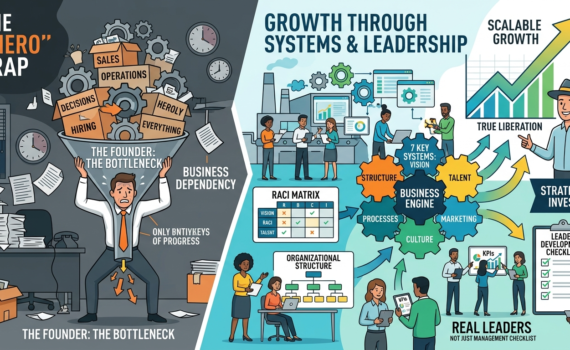
Introduction This article highlights an uncomfortable but liberating truth: most businesses don’t grow because they depend excessively on the founder. The owner becomes the bottleneck, doing everything, deciding everything, and carrying the operational burden.

It emphasizes that real growth comes when strong teams, replicable systems, and a distributed leadership culture are built. This article expands on that vision with depth, practical frameworks, operational checklists, and concrete strategies.

1. The “One Hero” Trap: Why Your Business Isn’t Growing

Many entrepreneurs fall into the trap of being indispensable. They work longer hours, control every detail, and end up enslaved by their own creation. Signs you’re in this trap:

  • You’re the only one closing major sales.
  • Strategic decisions stall if you’re not present.
  • The team expects constant instructions.
  • You bill well, but you don’t enjoy the money or have free time.

Moving from operator to leader requires a change in mindset: stop doing and start designing systems.

2. The 7 Fundamental Systems of Business Growth

A methodology has been developed based on 7 key systems:

  1. Vision and Strategy System — Total team alignment with clear objectives.
  2. Organizational Structure System — Defined roles, functional organizational chart.
  3. Talent and Leadership System — Attracting, developing, and retaining leaders.
  4. Process and Operations System — Documentation and standardization.
  5. Financial and Metrics System — Control of numbers and profitability.
  6. Marketing and Sales System — Predictable customer flow.
  7. Culture and Ownership System — Sense of belonging and shared responsibility.

Each system is broken down with key indicators, tools, and examples.

3. How to Develop Real Leaders (Not Just with a Title)

“Many want the title, but not the power.” Developing leaders takes time, sound judgment, and sustained accountability.

Checklist for Developing Leaders on Your Team:

  1. Identify candidates with potential (attitude + results).
  2. Assign projects with real responsibility and accountability.
  3. Provide weekly mentoring (one-on-one).
  4. Teach data-driven decision-making.
  5. Allow for controlled mistakes as learning experiences.
  6. Measure not only results, but also the ability to replicate.
  7. Celebrate visible leadership publicly.
  8. Create a clear path for growth and compensation.

4. Organizational Structures that Scale

Recommended designs by stage:

  • Initial stage (up to 10 people): Flat and agile.
  • Growth (10-50): Departmentalization.
  • Scale (>50): Matrix or process-based.

Checklist for Designing Structure:

  • Map current processes.
  • Define clear responsibilities (RACI matrix).
  • Eliminate overlaps.
  • Create job descriptions.
  • Establish KPIs for each role.
  • Review every 6 months.

5. Effective Delegation: From Micromanagement to Trust Practical

steps for delegating:

  • Select the appropriate task.
  • Define expected results and standards.
  • Grant real authority.
  • Establish review points.
  • Give constructive feedback.
  • Recognize success.

6. Culture of Ownership and Sense of Belonging

Connect with previous topics: the team must benefit from growth. Combine systems with financial models (profit sharing, variable bonuses, etc.).

7. Common Mistakes That Hinder Growth

  • Hiring too quickly and firing too slowly.
  • Lack of process documentation.
  • Failing to measure what matters.
  • Resistance to change.
  • Lack of investment in training.

8. Practical 90-Day Roadmap for Implementing Systems

Month 1: Diagnosis + Vision + Structure.

Month 2: Processes + Talent.

Month 3: Metrics + Culture + Adjustments.

Includes detailed weekly checklists, templates, and success metrics.

9. Case Studies and Practical Examples

Analysis of companies that applied these principles.

10. The Founder’s Role in the New Stage:

From Maker → Strategist → Investor. How to prepare the company for sale or massive scaling.

Conclusion

The central message is clear: your business can grow much more when you stop being the center of attention and make your team the driving force. By applying the systems, checklists, and principles presented, any entrepreneur can break the cycle of dependency, develop leaders, and build a company that endures.


  • 0

Enhancing Integration Performance with Asynchronous Communication

Category:Programming,SAP,SAP PI/PO Tags : 

Asynchronous communication, where messages are sent without immediate acknowledgment, can significantly improve the performance and scalability of integration processes. This approach allows for non-blocking operations, reduced latency, and increased throughput, making it a valuable tool for modern integration architectures.

Understanding Asynchronous Communication

In asynchronous communication, messages are sent to a queue or message broker, where they are stored until the recipient is ready to process them. This decoupling of the sender and receiver allows for greater flexibility and scalability.

Key Benefits of Asynchronous Communication

  • Improved Performance: Asynchronous communication eliminates the need for synchronous waits, reducing latency and improving overall system performance.
  • Increased Scalability: Asynchronous systems can handle higher message volumes without sacrificing performance, making them ideal for large-scale integrations.
  • Enhanced Reliability: Asynchronous communication can provide fault tolerance by allowing messages to be retried if processing fails.
  • Better Resource Utilization: Asynchronous systems can optimize resource usage by allowing multiple processes to handle messages concurrently.

Implementing Asynchronous Communication

To implement asynchronous communication in integration processes, consider the following approaches:

  1. Message Queues: Use a message queue system like RabbitMQ, Apache Kafka, or AWS SQS to store and deliver messages.
  2. Event-Driven Architecture: Design your integration using an event-driven architecture, where events trigger actions or workflows.
  3. Asynchronous APIs: If your integration involves APIs, ensure they support asynchronous communication or implement asynchronous wrappers.

Best Practices for Asynchronous Communication

  • Choose the right message queue: Select a message queue system that aligns with your specific requirements, such as scalability, reliability, and performance.
  • Implement error handling: Implement robust error handling mechanisms to ensure that messages are processed correctly and any failures are addressed.
  • Optimize message size: Keep message sizes as small as possible to reduce network traffic and improve performance.
  • Consider message durability: Determine the appropriate level of message durability based on your business requirements.
  • Monitor and tune: Regularly monitor your asynchronous communication system to identify performance bottlenecks and make necessary adjustments.

Case Study: Improving Order Processing with Asynchronous Communication

A large e-commerce company was experiencing performance issues with its order processing system. By switching to an asynchronous architecture, they were able to:

  • Reduce order processing time by 50%
  • Increase system scalability to handle peak demand
  • Improve reliability by reducing the impact of system failures

Conclusion

Asynchronous communication is a powerful tool for enhancing integration performance and scalability. By understanding its benefits and best practices, organizations can build more efficient and resilient integration systems that meet the demands of modern business requirements.


  • 0

SAP HANA Cloud Vector Engine: A Deep Dive

Category:Programming,SAP Tags : 

Introduction

SAP HANA Cloud Vector Engine (VQE) is a groundbreaking technology designed to accelerate data processing tasks within the SAP HANA Cloud platform. By leveraging the power of vectorized processing, VQE can significantly enhance the performance of various analytical workloads, including machine learning, graph analytics, and data warehousing.

Functions and Description

At its core, VQE operates by processing data in large batches or vectors rather than individual rows. This approach allows for more efficient utilization of hardware resources and reduces the overhead associated with traditional row-based processing. Key functions and characteristics of VQE include:

  • Vectorized Processing: VQE executes instructions on entire vectors of data, enabling parallel processing and optimizing CPU utilization.
  • SIMD (Single Instruction, Multiple Data): VQE leverages SIMD instructions to perform the same operation on multiple data elements simultaneously, further boosting performance.
  • Data Compression: VQE employs advanced data compression techniques to minimize memory footprint and improve query execution times.
  • In-memory Database: VQE is tightly integrated with the SAP HANA in-memory database, providing fast access to data and eliminating the need for disk I/O.
  • Scalability: VQE can scale horizontally to accommodate growing data volumes and workload demands.

Advantages of SAP HANA Cloud Vector Engine

The adoption of VQE offers several compelling advantages for organizations:

  • Enhanced Performance: VQE can deliver dramatic performance improvements for a wide range of analytical workloads, including machine learning, graph analytics, and data warehousing.
  • Reduced Latency: By processing data in large batches, VQE can significantly reduce query latency, enabling faster insights and decision-making.
  • Improved Scalability: VQE’s ability to scale horizontally allows organizations to handle increasing data volumes and workload demands without compromising performance.
  • Lower TCO: By optimizing hardware utilization and reducing query processing times, VQE can help organizations lower their total cost of ownership.
  • Simplified Development: VQE is seamlessly integrated into the SAP HANA Cloud platform, making it easy for developers and data scientists to leverage its capabilities.

Disadvantages of SAP HANA Cloud Vector Engine

While VQE offers numerous benefits, there are a few potential drawbacks to consider:

  • Complexity: Implementing VQE may require specialized expertise and careful tuning to achieve optimal performance.
  • Hardware Requirements: VQE may have specific hardware requirements, such as powerful CPUs with SIMD capabilities and sufficient memory.
  • Vendor Lock-in: As a proprietary technology, VQE may introduce vendor lock-in, limiting flexibility and potentially increasing costs.

Conclusion

SAP HANA Cloud Vector Engine represents a significant advancement in data processing technology. By leveraging the power of vectorized processing, VQE can deliver exceptional performance, scalability, and efficiency for a wide range of analytical workloads. Organizations looking to accelerate their data-driven initiatives should carefully consider the benefits and drawbacks of VQE to determine if it is the right fit for their needs.


  • 0

Unlocking the Power of APIs with Apigee: Building, Managing, and Protecting APIs at Scale

Category:Programming Tags : 

What is Apigee?

Apigee is a powerful native API management platform from Google Cloud that allows you to build, manage, and protect APIs in any environment or scale. With Apigee, you can create a consistent and reliable interface for your backend services using high-performance API proxies. These proxies give you detailed control over security, rate limiting, quotas, statistics, and much more for all your services.

What does Apigee offer?

Apigee provides an API proxy layer that sits between your backend services and internal or external clients looking to use your services. This proxy layer allows you to add a wide variety of policies to add security, traffic management, data mediation, extensions, and other functions to your APIs. Additionally, you can add custom code, conditional logic, fault handling, rate limiting, caching, and many other actions. All of this can be done without modifying the underlying backend services.

Who uses Apigee?

Apigee is designed to benefit two key types of users:

  1. API producers: Those who compile and manage the APIs that expose their backend services.
  2. API consumers: Those who use the data provided by the APIs in their client applications.

What are the challenges they face?

API producers face challenges such as security, visibility, and measurement parameters, while API consumers face challenges such as flexibility, ease of use, and reliability.

What are the key benefits of using Apigee?

Apigee’s API management offers features specifically designed to meet the needs of API producers and consumers. These benefits include API visibility, API statistics, and API reliability.

How to get started with Apigee?

To get started with Apigee, follow these steps:

  1. Install Apigee following the instructions provided in the documentation.
  2. Build your first API proxy following the indicated steps.
  3. Add features to your proxies by configuring policies and implementing security measures.

To learn more ways to leverage Apigee on Google Cloud, try our tutorials and training. Start using Apigee today and take your APIs to the next level!


  • 0

Unlocking Productivity and Collaboration with Google Workspace

Category:Business Management,Programming,Web Design Tags : 

In the ever-evolving world of technology, businesses are constantly seeking innovative ways to streamline their operations, enhance productivity, and foster seamless collaboration among employees. In this quest, Google Workspace emerges as a versatile and powerful solution that brings together a suite of tools and features designed to transform the way we work. Join us on a journey through the incredible benefits of Google Workspace and discover why it’s the ideal choice for businesses of all sizes.

What is Google Workspace?

Formerly known as G Suite, Google Workspace is a cloud-based productivity suite developed by Google. It comprises a collection of essential applications that are designed to empower teams to work smarter and more efficiently. These applications include Gmail, Google Drive, Google Docs, Google Sheets, Google Slides, Google Meet, and many more. By seamlessly integrating these tools, Google Workspace provides a comprehensive solution for communication, collaboration, and productivity.

The Benefits of Google Workspace:

  1. Enhanced Collaboration: Google Workspace is built with collaboration in mind. With real-time editing and sharing capabilities, multiple team members can work on documents simultaneously. Comments and suggestions make it easy to provide feedback, ensuring that everyone is on the same page.
  2. Effortless Communication: Gmail, the email service included in Google Workspace, is renowned for its reliability and user-friendly interface. You can access your emails from anywhere, and with integrated features like Google Chat, you can communicate with colleagues in real time.
  3. Secure and Reliable: Google Workspace is hosted in Google’s secure data centers, offering robust security features like two-factor authentication, encryption, and data loss prevention. Google’s infrastructure ensures uptime and reliability, so your team can stay productive without interruption.
  4. Scalability: Whether you’re a small startup or a large enterprise, Google Workspace can scale with your business. You can add or remove users easily, adapting the suite to your changing needs without significant IT overhead.
  5. Work Anywhere, Anytime: The cloud-based nature of Google Workspace means your team can work from anywhere with an internet connection. This flexibility is invaluable in today’s global and remote work environments.
  6. Cost-Effective: Google Workspace offers a pay-as-you-go pricing model, which means you only pay for the services you use. This eliminates the need for expensive hardware and software installations, saving your business money.
  7. Integrated Workspace: With Google Workspace, everything is connected. You can store your files in Google Drive, collaborate on documents in Google Docs, and hold virtual meetings with Google Meet, all from a single platform. This integration streamlines your workflow and saves time.
  8. Access to Google’s Ecosystem: Google Workspace seamlessly integrates with other Google services such as Google Calendar, Google Photos, and Google Analytics. This connectivity provides a comprehensive ecosystem for your business needs.

Join the Google Workspace Revolution Today!

In a fast-paced and interconnected world, staying ahead of the competition requires agility and adaptability. Google Workspace offers businesses the tools they need to succeed, providing a collaborative and productive environment that can scale with your company’s growth.

Join the ranks of leading organizations that have already harnessed the power of Google Workspace. Unlock your team’s potential, enhance productivity, and streamline your operations. Say goodbye to cumbersome email chains and file sharing challenges, and embrace a future where collaboration knows no boundaries.

Make the move to Google Workspace today and experience firsthand the transformative benefits that have made it the go-to choice for businesses worldwide. Your invitation to boost productivity and revolutionize collaboration awaits – don’t miss out!


Archives

Categories