Category Archives: Programming

  • 2

Revolutionizing Speech: How Technology and AI are Transforming Text-to-Speech with Human-like Voices

Category:Artificial Intelligence,Programming

Technology and artificial intelligence (AI) have come a long way in recent years, and one area where this is particularly evident is in the field of text-to-speech (TTS) synthesis. TTS systems are designed to convert written text into spoken words, and today’s TTS systems are able to produce human-like voices with a high degree of accuracy.

One of the key advancements that has made this possible is the development of deep learning algorithms. These algorithms are able to analyze large amounts of data and learn to recognize patterns and relationships between different sounds and words. This allows TTS systems to generate speech that sounds more natural and human-like.

Another important factor is the use of large datasets of recorded speech. These datasets are used to train TTS systems, and the more data that is available, the more accurate the system can become. In addition, the use of sophisticated algorithms to analyze and process the speech data also helps to improve the quality of the generated speech.

One of the most popular TTS systems available today is Google’s DeepMind WaveNet. This system uses a deep neural network to generate speech that sounds very natural. It is able to produce speech in a wide range of languages and dialects, and it can even mimic specific individuals’ voices.

Another example is Amazon’s Polly, which uses advanced machine learning techniques to produce lifelike speech. It offers a variety of natural-sounding voices, including voices in multiple languages, and allows users to customize the speed, pitch and volume of the generated speech.

The TTS systems also have many practical applications, such as in virtual assistants, voice-controlled devices, and accessibility technology for people with hearing impairments. In the future, it’s likely that TTS technology will continue to improve, becoming even more natural and human-like, and finding new applications in a variety of fields.

In conclusion, the technology and artificial intelligence have made a great development in the field of text-to-speech synthesis. The use of deep learning algorithms and large datasets of recorded speech have improved the accuracy of TTS systems and made it possible to produce human-like voices. TTS technology is already being used in many practical applications, and it is likely to continue to evolve and improve in the future.


  • 0

Splitting Messages in SAP PO using a Java Mapping

Category:Programming,SAP,SAP PI/PO

Here is an example of a Java mapping in SAP PO that splits a message using the String.split() method:

import java.util.Arrays;

import com.sap.aii.mapping.api.*;

public class MessageSplitter extends AbstractTransformation {

    public void transform(TransformationInput input, TransformationOutput output) throws StreamTransformationException {
        try {
            // Get input and output payload
            InputPayload in = input.getInputPayload();
            OutputPayload out = output.getOutputPayload();

            // Read input message into a string
            byte[] bytes = new byte[in.getInputStream().available()];
            in.getInputStream().read(bytes);
            String inputMessage = new String(bytes);

            // Split message using a delimiter
            String delimiter = ",";
            String[] parts = inputMessage.split(delimiter);

            // Write the parts to the output payload
            for (String part : parts) {
                out.getOutputStream().write(part.getBytes());
            }
        } catch (Exception e) {
            throw new StreamTransformationException(e.getMessage());
        }
    }
}

In this example, the input message is read into a string, then split using the comma (“,”) delimiter. The resulting parts are then written to the output payload, one after the other. You can change the delimiter to any string you want to use as a separator.

Please keep in mind that this is just an example and it may need further adaptation depending on the specific requirements of your integration scenario


  • 1

How To Secure a JMS connection in SAP PI with TLS 1.2 to IBM MQ

Category:Programming,SAP,SAP PI/PO

There are plenty resources on this topic, but this post based on my experience intend to allow SAP Customers that are still using SAP PI as the top integration solution in their landscape, to allow to secure their integration scenaries between an SAP system like CRM (Customer Relationship Management), ERP (Enterprise Resource Planning), SOLMAN (Solution Manager) between antohers and the IBM MQ system.

Goal

The goal of this post is to allow you to setup a TLS connection between an an IBM MQ system  version 7.5 or upper and a SAP PI system running over Netweaver(NW) 7.4 or upper using a communication channel type JMS versión 1.x or 2.x.

Assumptions

  • The JMS drivers are already deployed at the Netweaver System.
  • The JVM is already updated to the last version available.
  • The Netweaver components are already updated to the last version available.

Steps

1. Oracle usually is the provider of the Java Virtual Machine (JVM) used at Operating System level where the Netweaver is installed, since MQ System use the IBM JVM, this could create the issue “2393 MQRC_SSL_INITIALIZATION_ERROR / MQRC_UNSUPPORTED_CIPHER” once the channel wll be started. In order to prevent that Cipher Suite Mapping should be disable, this will be achieved following steps described at Note 2218025.

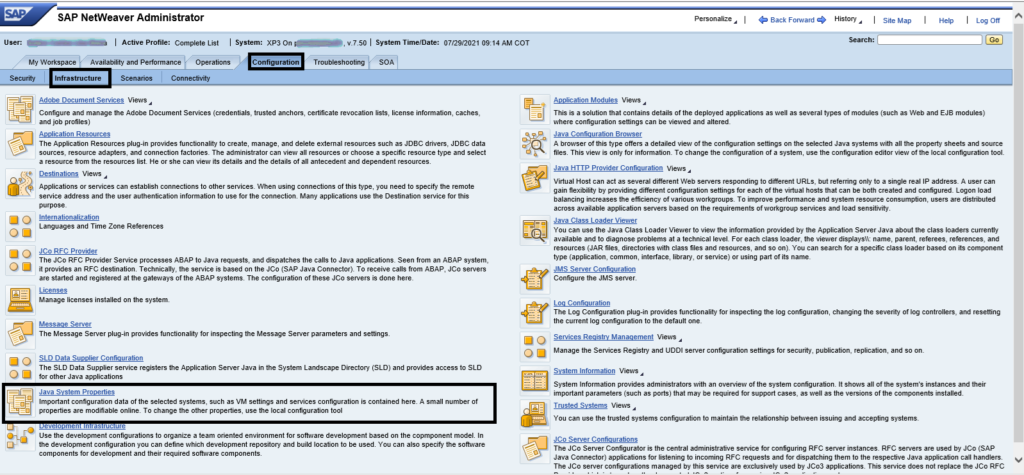
1.1. Please logon to the NWA and once there, please locate the Configuration Tab -> infrastructure -> Java System Properties

Step 1.1 Configuration Tab -> infrastructure -> Java System Properties

1.2. Once there, the node Z* should be selected and navigate to the tab System VM Parameters,  there add the following parameter.

com.ibm.mq.cfg.useIBMCipherMappings=false

Step 1.2 Node-> System VM Parameters

2. Adjust the allowed security protocols that could be used to stablish a handshake at the system; in order to do this must follow the same steps defined at point 1.1, once there add the following parameter:

jdk.tls.client.protocols = TLSv1,TLSv1.1,TLSv1.2

Be aware that this is just an illustrative example.

3. In order to prevent the issue “error connecting due to missing class com.ibm.mq.jms.MQQueueConenctionFactory“, the SAP Note 1751177 should be applied, this will allow to preload the related classes of MQ Driver

3.1 Please login into NWA and go through this path Java System Properties → Applications, once there please be aware to select the property com.sap.aii.adapter.jms.app application and modify the property value.

MQ 7.50

Set the “preloadClasses” property as: com.ibm.mq.MQEnvironment,com.ibm.mq.internal.MQCommonServices,com.ibm.mq.jms.MQQueueConnectionFactory,com.ibm.mq.jms.MQTopicConnectionFactory.

Step 3.1 Java System Properties → Applications->com.sap.aii.adapter.jms.app application

4. Once this activities will be finished, ask to your Basis team to make a full restart of the application.

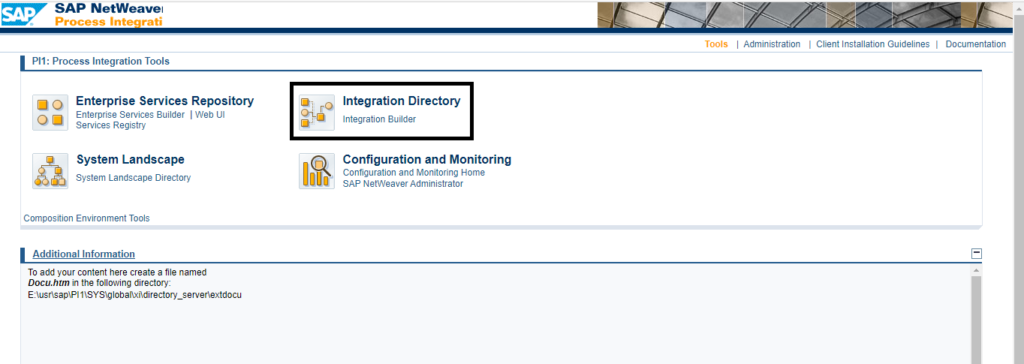
5. Create or Modify the communication channel using the integration builder tool or through NWDS

Be aware to create the communication Channel at the Integration directory as JMS 1.X under NW 7.4 or 2.x under NW7.5

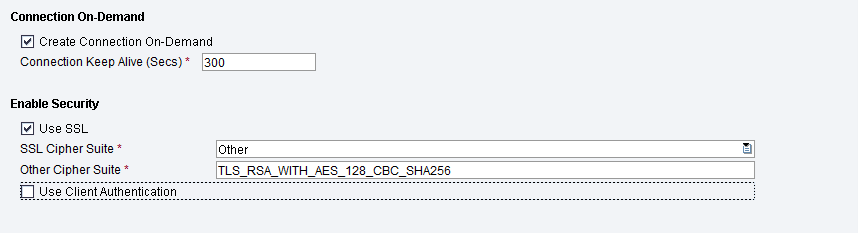
Then at the option Enable Security, mark useSSL and select OTHER in the SSL Cipher Suite dropdown, next be aware to write the ciphersuite that will be used in the other cipher suite text field.

Conclusion 

In summary, securing our internal connections will allow us to protect the data, our most valuable assets inside the companies and this post will help you to enable secure connections from your NW PI/PO systems to external servers.

I hope this article was valuable and i appreciate your feedback, comments or suggestions, please feel ree to reache out me if you have any further question

Read More


Archives

Categories