Category Archives: Programming

  • 0

10 Must-Have AI Tools for Enhanced Productivity and Creativity

Category:Artificial Intelligence,Programming

Artificial intelligence (AI) is revolutionizing the way we work and create. AI tools can help us be more productive by automating tasks, making better decisions, and generating creative ideas.

In this article, we present 10 essential AI tools for improving productivity and creativity. These tools cover a wide range of applications, from time management to creative writing.

1. Rose.ai – Research Faster Looking to save time on research? Rose.ai is your answer. This AI-powered research tool utilizes advanced algorithms to scour the internet for relevant information, helping you gather insights and data in a fraction of the time it would take manually.

2. Opus.pro – Content Repurposing Content creation can be a daunting task, but Opus.pro is here to streamline the process. Transform your existing content into fresh and engaging formats with the help of AI. Repurpose articles into videos, infographics, and more, maximizing your content’s reach and impact.

3. Elai.io – Create AI Videos from Text Video production just got a lot easier with Elai.io. Simply input your text, and this tool will generate captivating videos using AI. From explainer videos to animations, Elai.io empowers you to bring your ideas to life visually.

4. Remail.ai – Write Emails 10x Faster Say goodbye to writer’s block when composing emails. Remail.ai harnesses AI to assist you in crafting emails swiftly and effectively. It understands your tone and intent, ensuring your emails are not only quick to write but also convey the right message.

5. Durable.co – Build Websites with AI Even if you’re not a seasoned web developer, Durable.co enables you to create stunning websites effortlessly. With AI-driven design suggestions and user-friendly interfaces, you can now bring your online presence to life with ease.

6. Stockimg.ai – Crea imágenes con IA Visual content is essential and Stockimg.ai helps you create eye-catching images without the need for complicated design skills. Customize images for your social media, blog posts, or presentations using AI-powered tools.

7. Clipdrop.co – Create Images with AI Visual content is essential and With Clipdrop, you can create stunning visuals in seconds by simply entering a text prompt. For example, you could type in “a photorealistic painting of a cat sitting on a red couch” and Clipdrop would generate four images that match your description.

8. Postwise.ai – Viral Tweets in Seconds Crafting tweets that capture attention is an art, and Postwise.ai is your muse. This tool suggests tweet ideas, optimizes hashtags, and fine-tunes your content to maximize engagement, giving your tweets the best chance to go viral.

9. Jitter.video – Motion Design Made Simple Motion graphics add flair to your projects, and Jitter.video simplifies the process. Create dynamic motion designs without extensive expertise. Let AI handle the intricate animations while you focus on the creative concept.

10. Snackprompt.com – Discover ChatGPT Prompts Unleash the power of OpenAI’s ChatGPT with Snackprompt.com. Discover creative prompts and ideas for your AI-powered conversations. Whether you’re writing, brainstorming, or just having fun, ChatGPT is at your service.

Embrace the Future of Productivity and Creativity These 10 AI tools are just a glimpse of the incredible advances that are transforming the way we work and create. Harness the power of AI to streamline your tasks, improve your content, and unlock new levels of productivity and creativity.


  • 0

Testing Remote Connection to SQL Server: Step-by-Step Guide and Troubleshooting

Category:Programming,Web Design Tags : 

Introduction:

The ability to establish remote connections to SQL servers is essential in today’s technology landscape. This enables users to access databases and resources stored on servers from different geographical locations. In this guide, we will delve into how to thoroughly test and set up a remote connection to a SQL server from another computer. From ensuring network connectivity to SQL server configuration and creating connection strings, we will cover all the necessary aspects to ensure a successful connection. Additionally, we will address potential hurdles that may arise and provide troubleshooting solutions to ensure that your remote connection experience is as seamless and secure as possible. Keep reading to gain a comprehensive understanding of how to effectively perform connection tests to a SQL server from a remote computer.

To test a connection to a SQL Server from another PC, you can follow these steps:

  1. Ensure Network Connectivity:
    • Make sure both PCs are connected to the same network, whether it’s a local area network (LAN) or a wide area network (WAN). They should be able to communicate with each other.
  2. Enable Remote Connections:
    • On the SQL Server machine, ensure that remote connections are allowed. This involves enabling the SQL Server to accept incoming connections from other computers. You might need to configure the server’s firewall settings and enable TCP/IP protocol.
  3. Check SQL Server Configuration:
    • Open the SQL Server Configuration Manager on the SQL Server machine.
    • Make sure the SQL Server service is running.
    • Check the protocols enabled for the SQL Server instance. TCP/IP should be enabled for remote connections.
  4. Determine Connection Details:
    • You’ll need to know the SQL Server’s hostname or IP address, the port number (usually 1433 for the default instance), and the SQL Server instance name (if applicable).
  5. Create Connection String:
    • On the PC you want to test the connection from, you’ll need to create a connection string. This string contains the necessary information to establish a connection to the SQL Server. Here’s an example of a connection string for a SQL Server:arduino
  • Server=ServerName\InstanceName;Database=DatabaseName;User Id=UserName;Password=Password; Replace ServerName, InstanceName, DatabaseName, UserName, and Password with the appropriate values.

Remember that security is important, especially when dealing with remote connections. Use strong passwords, consider using Windows Authentication where possible, and restrict access to only the necessary IPs or ranges.

Also, keep in mind that these steps might vary slightly depending on your SQL Server version and network configuration. Always refer to the official documentation for your specific SQL Server version for accurate instructions.


  • 0

ChatGPT: Your Assistant, Not a Replacement – Embracing the Power of AI Collaboration

Category:Artificial Intelligence,Programming Tags : 

Introduction

In the age of rapid technological advancement, artificial intelligence has become an integral part of our lives, transforming the way we work, communicate, and interact with the digital world. One such remarkable AI tool is ChatGPT, a creation of OpenAI, designed to assist users in various tasks through its natural language processing capabilities. However, it’s important to understand that ChatGPT is not intended to replace human interaction; instead, it aims to be a valuable assistant that collaborates with users, enhancing productivity and opening new avenues of innovation.

Harnessing AI Assistance

ChatGPT’s potential lies in its ability to complement human capabilities. Rather than replacing human interaction, it offers an opportunity for collaboration that can lead to improved outcomes. The AI is proficient in understanding context, generating coherent responses, and offering quick information retrieval. This makes it an ideal ally for tasks such as drafting content, brainstorming ideas, providing explanations, and more.

Human-AI Symbiosis

Embracing ChatGPT as an assistant rather than a replacement emphasizes the concept of human-AI symbiosis. When humans and AI work together, they can amplify each other’s strengths. Humans provide the critical thinking, creativity, and emotional understanding that AI lacks, while AI contributes efficiency, data processing, and automation capabilities that humans may find time-consuming. The result is a harmonious partnership that leverages the best of both worlds.

Productivity Enhancement

ChatGPT serves as a tool for productivity enhancement. By handling routine queries, research, and information gathering, it frees up human users to focus on tasks that require deeper analysis, creativity, and decision-making. For professionals across industries, this means the potential to accomplish more in less time.

AI Ethics and Boundaries

It’s important to recognize that while ChatGPT is a remarkable assistant, it has limitations. It lacks human emotions, moral judgment, and a true understanding of complex human experiences. This necessitates careful consideration of the ethical boundaries when using AI tools. Users must understand that AI-generated content should always be reviewed, edited, and contextualized by humans to ensure accuracy, relevance, and alignment with human values.

ChatGPT Plus Subscription

For those eager to embrace the assistance of ChatGPT, OpenAI offers the ChatGPT Plus subscription. This premium subscription provides benefits such as general access during peak times, faster response times, and priority access to new features and improvements. To subscribe to ChatGPT Plus and enjoy enhanced AI collaboration, you can visit [insert link to subscription page].

Conclusion

ChatGPT represents a significant stride in AI technology, opening doors to collaboration and innovation that were previously unimaginable. As we integrate AI tools like ChatGPT into our workflows, it’s essential to remember that they are designed to enhance our abilities, not replace our unique human qualities. By harnessing the power of AI collaboration and understanding its capabilities and limitations, we can pave the way for a future where humans and AI work in tandem to achieve greater productivity, creativity, and efficiency.


  • 0

Integrating ChatGPT with SAP Solution Manager for ABAP Code Validation and Unit Testing Automation

Category:Programming,SAP,SAP ABAP Tags : 

Summary:
In this article, we explore the possibilities of integrating ChatGPT, an AI language model developed by OpenAI, with SAP Solution Manager (SolMan) to enhance ABAP code development compliance validation and automate unit testing. By leveraging the capabilities of ChatGPT, developers can receive real-time feedback on ABAP code compliance, generate unit tests using data from the SAP system, and improve overall code quality and efficiency.

Integration Approach:
To connect SAP SolMan with ChatGPT, we can utilize the following approaches:

  1. ChatGPT API: Consider SAP SolMan can utilize the ChatGPT API in order to send ABAP code snippets for validation. The API would provide a communication channel for SolMan to interact with ChatGPT and receive compliance feedback.
  2. Custom SolMan App: Develop a custom application within SolMan that incorporates ChatGPT. The application would allow developers to submit ABAP code for compliance validation and receive feedback directly within SolMan’s user interface.
  3. ChatGPT Integration via Middleware: Employ a middleware solution, such as a chatbot platform, to connect SAP SolMan with ChatGPT. The middleware acts as an intermediary, enabling communication between SolMan and ChatGPT, and handling the data exchange between the systems.

Code Compliance Validation:

By connecting SAP SolMan with ChatGPT, developers can leverage AI-powered natural language processing to validate ABAP code compliance. Here’s an example of how the integration can work:

  1. Developer submits ABAP code for validation: Within SAP SolMan, developers can initiate a request to validate their ABAP code by sending it to ChatGPT via the integration.
  2. ChatGPT analyzes the code: ChatGPT receives the ABAP code and performs an analysis based on predefined compliance rules. It identifies potential issues, such as deprecated functions, performance bottlenecks, or security vulnerabilities.
  3. Compliance feedback: ChatGPT provides real-time feedback to the developer, highlighting compliance violations, suggesting improvements, and offering best practices. This helps developers ensure that their code adheres to coding standards and industry guidelines.
  4. Code optimization suggestions: ChatGPT can also provide suggestions for optimizing the ABAP code, improving efficiency, and enhancing overall performance. It can recommend alternative approaches, propose code refactoring, or suggest the use of more efficient functions or techniques.

Unit Testing Automation:

Integrating SAP Solution Manager with ChatGPT opens up possibilities for automating unit testing by utilizing real-time data from the SAP system. Here’s an outline of how this integration can enhance unit testing:

  1. Test case generation: Developers can define the requirements and conditions for unit tests within SAP SolMan. ChatGPT can assist in generating test cases by analyzing the ABAP code, identifying relevant variables and data dependencies, and recommending test scenarios.
  2. Data extraction: ChatGPT communicates with the SAP system to retrieve relevant data for unit testing. It can query the system to extract sample data, simulate user interactions, or fetch data from specific tables or business objects.
  3. Test case execution: SAP SolMan, integrated with ChatGPT, can automatically execute the generated unit tests using the extracted data. The tests are performed against the ABAP code, validating its functionality and ensuring expected results.
  4. Test result analysis: ChatGPT can analyze the test results and provide feedback on the code’s behavior, identifying potential issues or failures. It can assist in diagnosing errors, suggesting debugging techniques, or proposing solutions to fix the code.

By automating unit testing and utilizing real SAP system data, developers can ensure that their ABAP code functions correctly and is thoroughly tested, leading to improved software quality and reduced time spent on manual testing.

Overall Benefits:

The integration of ChatGPT with SAP Solution Manager for ABAP code validation and unit testing automation offers several benefits, including:

  1. Improved code quality: Real-time compliance validation and optimization suggestions from ChatGPT help developers write clean, efficient, and maintainable code.
  2. Time savings: Automation of unit testing reduces the manual effort required for testing and allows developers to focus on other critical tasks.
  3. Enhanced collaboration: ChatGPT can act as a virtual assistant, providing instant feedback and recommendations, fostering collaboration between developers and the AI system.
  4. Increased productivity: With automated compliance checks and unit testing, developers can deliver high-quality code faster, accelerating the software development lifecycle.
  5. Continuous improvement: ChatGPT can learn from the feedback provided by developers and evolve its suggestions and recommendations over time, improving its effectiveness and accuracy.

In conclusion, i could consider that integrating ChatGPT with SAP Solution Manager will enable developers to leverage AI capabilities for ABAP code compliance validation and unit testing automation. This integration promotes code quality, accelerates development processes, and facilitates collaboration within the SAP ecosystem.


  • 0

How to carry out transports in SAP PI/PO using CTS (Change and Transport System)

Category:Programming,SAP,SAP PI/PO Tags : 

In today’s business world, seamless integration and process automation are essential for efficient operation. SAP Process Orchestration has established itself as a leading solution for business process management and system integration. However, deploying changes in an SAP environment can be challenging, especially when looking to maintain system consistency and integrity at all times. This is where the Change and Transport System (CTS) comes into play as a crucial tool. In this article, we will explore how to make the most of CTS to make transport of changes in SAP Process Orchestration easier and faster, enabling more efficient change management in the system and ensuring operational continuity without compromising stability.

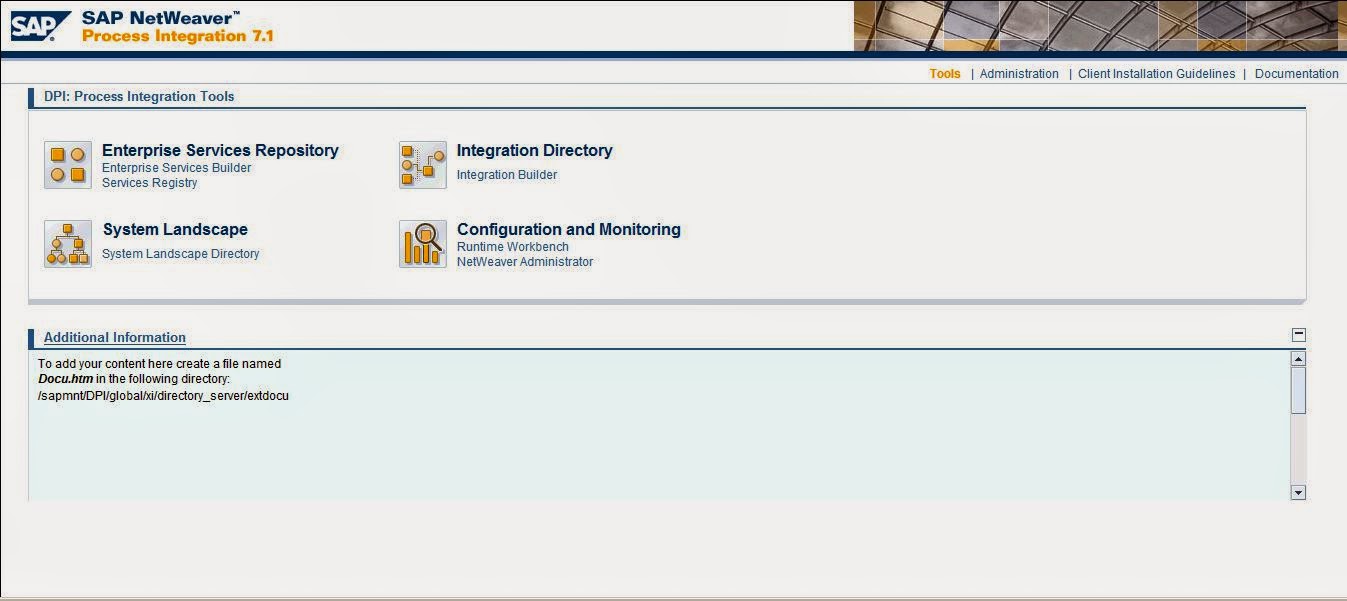
1. Ingrese a la url

https://<SERVIDOR>:<PUERTO>/dir/start/index.jsp

2. Select the following from the options displayed:

3. Enterprise Service Repository

4. Enter the transfer design objects option

5. Once the option is selected, the object transport wizard opens; there is the option of exporting using the CTS or exporting via files

6. The next step is to select what we want to export, there are 4 options.

The first option is all the objects of a software component, it is the most indicated to overwrite an object or to create a new object; the others allow transport to be carried out selectively

7. The transfer order is selected and the process is finished

In conclusion, effective implementation of SAP Process Orchestration becomes a sustainable reality when combined with a strong strategy of change and transport management through the use of CTS. Throughout this article, we have highlighted how this synergy can enable organizations to not only deploy change more efficiently, but also maintain the integrity and consistency of the ever-evolving system. The optimization of business processes and the agile adaptation to changing market demands depend to a large extent on the ability to manage and control changes effectively. By leveraging the capabilities of the CTS within SAP Process Orchestration, companies can achieve greater reliability in their operations and stay competitive in an ever-changing business environment.

Published first time at https://gds-tipsandtricks.blogspot.com/2019/11/como-realizar-trasportes-en-sap-pi.html


  • 0

How to valuate a Domain

Category:Business Management,Programming,Web Design

Let’s consider that we have a domain and need to valuate it, maybe to be included in the assets of a company or to be listed for selling, in this case valuating a domain name involves assessing its worth based on various factors that can influence its desirability and potential market value. The value of a domain name can be determined by considering the following key aspects:

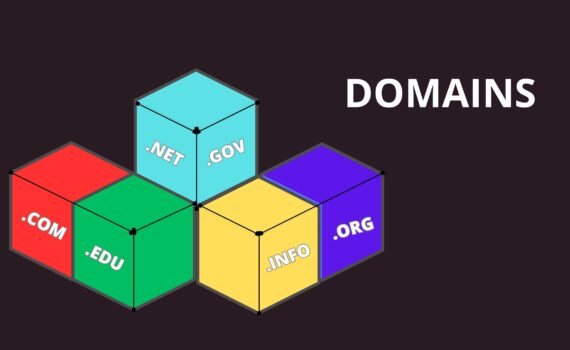
  1. Domain Extension: The top-level domain (TLD) extension can significantly impact the value. Generally, “.com” domains are considered more valuable and widely recognized compared to other TLDs like “.net,” “.org,” or country-specific extensions like “.co.uk” or “.de.”
  2. Length and Simplicity: Short, concise, and easy-to-remember domain names tend to be more valuable. They are easier for users to type, remember, and share with others.
  3. Keywords: Domain names containing popular and relevant keywords related to a specific industry, product, or service can be more valuable. They may have better search engine optimization (SEO) potential, making them attractive to businesses.
  4. Brandability: Unique and brandable domain names that are catchy and memorable can command higher value. A brandable domain is more likely to resonate with users and stand out from the competition.
  5. Market Demand: The demand for domain names in a particular industry or niche can significantly influence their value. If the domain is highly sought after by many potential buyers, its price will likely be higher.
  6. Traffic and History: Established domain names with a history of receiving significant traffic and backlinks can be more valuable. A domain with an existing audience may be attractive to businesses looking to save time and effort in building a new online presence.
  7. Trademark Issues: Domains that infringe on existing trademarks or are associated with controversial or sensitive topics may have lower value or legal risks.
  8. Comparable Sales: Analyzing recent sales of similar domain names can provide a benchmark for determining the domain’s value. There are online marketplaces and domain valuation tools that can help identify comparable sales.
  9. Development Potential: The potential for the domain to be developed into a profitable website or online business can also affect its value. A domain with a clear business concept and potential for growth may be more valuable.
  10. Overall Market Conditions: Like any market, domain name values can fluctuate based on overall economic conditions and trends in the domain industry.

Domain valuation could be considered both as an art and a science, and it’s essential to consider multiple factors to arrive at a reasonable estimate. It’s recommended to consult with domain experts or use reputable domain appraisal services to get a more accurate valuation. Keep in mind that the actual value of a domain is ultimately determined by what a buyer is willing to pay for it, making the valuation process subjective to some extent.


  • 0

How to process http status code 500 in SAP PO

Category:Programming,SAP,SAP PI/PO Tags : 

Many times we have built integrations between SAP PO and a legacy system using the SOAP channel, however after having done so, it has also happened to us when consuming a web service we find that the scenario does not work and when checking the message monitor in the log section, we find a brief message “error 500 internal server error”, which does not provide details of what happened; however there is a solution for this situation:

Solution:

  • Make sure you have checked the availability of the web service. You can do this by testing the web service directly from your web browser.
  • Login to SAP PI/PO and open the Integration Builder.
  • Open the SOAP type communication channel and add the option not to use Over SOAP.
  • Go to Module section.
  • Add the following values in Module Configuration.

XMBWS.NoSOAPIgnoreStatuscode = true

This allows the adapter to ignore the HTTP status code but will only be effective if used in combination with Do Not Use SOAP Envelope.

noSOAPMakeSysErrFromResponseFault = false


  • 0

Implementing DevOps in SAP: Streamlining Software Delivery and Operations

Category:Programming,SAP Tags : 

In today’s fast-paced digital landscape, organizations are constantly seeking ways to enhance their software development processes and optimize operations, under this premise, consider DevOps, a methodology that emphasizes collaboration, automation, and continuous improvement, this methodology has been proven to be highly effective in driving efficiency and innovation in the software industry. While DevOps has gained significant traction in various domains, its application in the realm of SAP (Systems, Applications, and Products) implementations is an emerging trend that holds immense potential.

Consider implementing DevOps in SAP environments as a transformative approach to streamline software delivery and operations, leading to increased agility, improved quality, and faster time-to-market. By breaking down silos between development and operations teams, organizations can foster collaboration, ensure better communication, and align business objectives with technology initiatives. This article explores key strategies and best practices for successfully implementing DevOps in SAP.

  1. Establishing a DevOps Culture: Implementing DevOps requires a cultural shift within an organization. Encourage collaboration, transparency, and shared responsibilities across development, operations, and other relevant teams. Foster a culture that values continuous learning and improvement, promoting innovation and experimentation.
  2. Automating Processes: Automation plays a pivotal role in accelerating software delivery and minimizing errors. Automate repetitive tasks such as building, testing, and deployment processes. Utilize infrastructure-as-code and configuration management tools to maintain consistency and scalability in SAP landscapes.
  3. Continuous Integration and Deployment: Implement continuous integration (CI) and continuous deployment (CD) pipelines to ensure that changes to SAP applications are continuously tested, integrated, and deployed in a controlled manner. This reduces the risk of introducing errors and streamlines the release process.
  4. Version Control and Configuration Management: Employ version control systems to manage and track changes to SAP code and configurations. This enables better collaboration, code review, and rollbacks if needed. Configuration management tools ensure consistency and reproducibility across different environments.
  5. Monitoring and Performance Optimization: Implement robust monitoring and logging mechanisms to gain visibility into SAP applications’ performance and identify bottlenecks or issues. Leverage automated testing and performance analysis tools to optimize application performance and ensure the highest level of quality.
  6. Security and Compliance: Integrate security practices into the DevOps pipeline to ensure that SAP applications adhere to industry standards and regulatory requirements. Implement security testing, vulnerability scanning, and automated compliance checks to proactively identify and address security risks.
  7. Continuous Learning and Feedback: Encourage a culture of continuous learning and feedback loops. Conduct regular retrospectives to reflect on improvements and identify areas for optimization. Gather feedback from end-users, stakeholders, and operations teams to drive ongoing refinement of the SAP implementation.

As we could see, implementing DevOps in SAP environments is considered an strategic decision that requires careful planning, collaboration, and stakeholder buy-in, at also by adopting DevOps principles, organizations can break down traditional barriers, drive collaboration between teams, and achieve greater agility and efficiency in their SAP implementations. Embracing DevOps in SAP can lead to improved software quality, accelerated release cycles, and ultimately, enhanced customer satisfaction.

In conclusion, the implementation of DevOps principles and practices in SAP environments offers a transformative approach to optimize software delivery and operations. By fostering a culture of collaboration, automation, and continuous improvement, organizations can achieve agility, quality, and faster time-to-market in their SAP


  • 0

  • 0

Applied Artificial Intelligence: Success stories in the business world

Category:Artificial Intelligence Tags : 

Introduction

Artificial intelligence (AI) is a branch of computer science that deals with the creation of intelligent agents, which are systems that can reason, learn, and act autonomously. AI has been around for decades, but it is only in recent years that it has begun to make a significant impact on the business world.

There are many reasons for this. First, the amount of data that businesses have access to has exploded in recent years. This data can be used to train AI systems to perform a wide range of tasks, from customer service to fraud detection.

Second, the cost of computing power has plummeted. This has made it possible for businesses to deploy AI systems without breaking the bank.

Third, the development of new AI algorithms has made it possible for AI systems to learn and adapt in ways that were not possible before. This has led to a new generation of AI systems that are more powerful and versatile than ever before.

Success stories

There are many examples of businesses that have successfully applied AI to their operations. Here are a few of the most notable success stories:

  • Amazon Go is a cashierless convenience store that uses AI to track customers as they shop and automatically charge their accounts when they leave the store.
  • Google Translate is a free online translation service that uses AI to translate text between over 100 languages.
  • KLM is an airline that uses AI to predict passenger demand and optimize flight schedules.
  • Spotify is a music streaming service that uses AI to recommend songs to users based on their listening history.
  • Netflix is a streaming service that uses AI to recommend movies and TV shows to users based on their viewing history.

These are just a few examples of the many ways that AI is being used to improve businesses. As AI continues to develop, we can expect to see even more innovative and groundbreaking applications of this technology in the years to come.

Challenges and opportunities

While AI has the potential to revolutionize many industries, it also presents some challenges for businesses. One challenge is that AI systems can be complex and difficult to develop and maintain. Another challenge is that AI systems can be biased, which can lead to discrimination against certain groups of people.

Despite these challenges, the opportunities that AI presents for businesses are vast. AI can help businesses to improve efficiency, reduce costs, and make better decisions. It can also help businesses to reach new customers and create new products and services.

As AI continues to develop, it is important for businesses to stay up-to-date on the latest trends and technologies. By doing so, businesses can position themselves to take advantage of the many opportunities that AI has to offer.

References

  • How Artificial Intelligence Is Transforming Business: https://www.businessnewsdaily.com/9402-artificial-intelligence-business-trends.html
  • 3 enterprise AI success stories: https://www.infoworld.com/article/3615449/3-enterprise-ai-success-stories.html
  • Industry 4.0 – 8 Interesting AI Success Stories: https://computd.nl/expert-view/8-interesting-ai-success-stories/
  • How Artificial Intelligence Can Help your Business: https://www.businessgo.hsbc.com/en/article/how-artificial-intelligence-can-help-your-business
  • The impact of AI on business: https://www.microsourcing.com/learn/blog/the-impact-of-ai-on-business


Archives

Categories