

DIY Guide: Install and Production-Ready SAP Cloud Connector (SCC)
Category:Programming,SAP,SAP BTPThe hard truth (and the useful one)
SAP Cloud Connector is not “just an installer.” It’s a security component that creates a controlled bridge between your on-prem network and SAP BTP. If you treat it like any other setup wizard, you’ll end up running it with too many privileges, opening more than you should, and having too little visibility. And yes—those shortcuts usually detonate in production, right on schedule.
That said, SCC is one of the most rewarding SAP platform building blocks when configured correctly: it reduces attack surface (traffic is outbound), enforces allowlists, separates environments with Location IDs, and gives your integration landscape a scalable foundation.
This DIY guide takes you from zero to “connected” with an enterprise-ready approach: prerequisites, architecture decisions, installation on Windows or Linux, connecting to your BTP subaccount, publishing resources (HTTP/RFC), testing, hardening, operations, and troubleshooting.
1) What SAP Cloud Connector is and when you need it
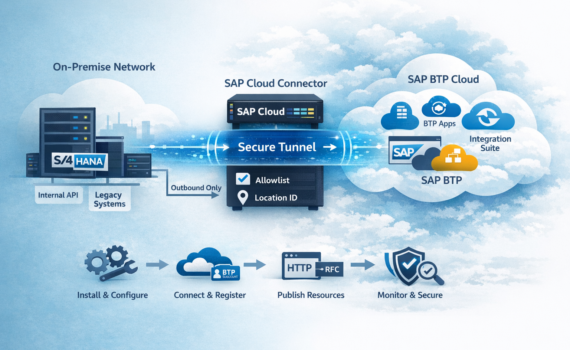
SCC is an agent that runs inside your network (datacenter or VPC) and establishes a secure tunnel to SAP BTP. Its purpose is to enable Cloud-to-On-Premise connectivity for services and apps in BTP without exposing internal systems to the Internet.
Typical use cases
- SAP Integration Suite (Cloud Integration/CPI) consuming internal APIs (HTTP/S) or RFC into ECC/S/4HANA.
- Apps on SAP BTP (Cloud Foundry / Kyma) accessing internal services (OData, REST, SOAP, RFC).
- Controlled connectivity to non-SAP internal endpoints (microservices, internal gateways, legacy ESB).
When it’s not the best option
- If your strategy is “API-first inbound” with API Gateway + WAF + OAuth and your org prefers controlled exposure to the Internet.
- If you need direct inbound traffic into your network from the public Internet (SCC is designed to avoid that).
- If your main pain is identity/IAM: SCC solves connectivity—not IAM.
2) Architecture in 5 minutes: how traffic flows
Think of SCC as a “reverse proxy controlled by an allowlist,” built around an outbound tunnel:
- BTP (your app or Integration Suite) requests a “virtual” resource (virtual host/port).
- BTP connectivity services route the request through the secure channel to the right SCC instance.
- SCC translates virtual host/port → real internal host/port only if it’s allowed.
- The response returns through the same channel.
Key benefits
- Outbound-only from your network to BTP (typically HTTPS 443). Fewer firewall wars.
- Allowlist by resource: you don’t publish “the system,” you publish specific paths/services.
- Separation by subaccounts and Location ID: governance and clean DEV/QA/PRD separation.
- Auditability: logs, traces, and controlled change management.
3) Prerequisites: don’t skip this (future-you will thank you)
This isn’t “paperwork.” It’s risk management.
3.1 Infrastructure
- Dedicated server or VM (recommended).
- CPU/RAM: for most scenarios, 2 vCPU and 4–8 GB RAM is fine. For high CPI volume, size based on load tests.
- Disk: usually 10–20 GB; prioritize decent IOPS if you’ll use traces.
- HA/criticality: decide if SCC is a critical platform component or a tactical enabler.
3.2 Network
- Internet egress from SCC host to SAP BTP endpoints (HTTPS/443). Corporate networks often require a proxy.
- Stable DNS: SCC depends on DNS for BTP endpoints and internal systems.
- Internal reachability from SCC to what you publish (S/4HANA, APIs, gateways, etc.).
- Admin UI port (HTTPS). Often 8443 by default—restrict access (admin segment/bastion only).
3.3 SAP BTP
- SAP BTP subaccount.
- Connectivity service enabled according to your consumption model.
- Permissions to manage connectivity and Destinations.
3.4 Security & compliance
- Define who administers SCC (roles, rotation, least privilege).
- Decide whether to replace the UI certificate with a corporate TLS cert (recommended for regulated environments).
- Define log retention and whether to centralize into SIEM.
4) Quick design before you click “Next”: decisions that prevent rework
4.1 One SCC per environment (almost always yes)
- DEV, QA, PRD ideally in separate subaccounts and/or different Location IDs.
- Avoid mixing PRD with DEV on the same SCC unless governance explicitly allows it.
4.2 Standard naming (because chaos doesn’t scale)
Define conventions for:
- Subaccount mapping:
btp-<country>-<domain>-<env> - Location ID:
LOC_<APP>_<ENV>(e.g.,LOC_LTC_PRD) - Virtual Host:
vh-<system>-<env>(e.g.,vh-s4-prd) - Destinations:
S4_PRD_RFC,API_PRD_ODATA, etc.
4.3 What you will expose (minimum viable inventory)
- HTTP(S): OData
/sap/opu/odata/, SOAP/sap/bc/srt/, internal REST, etc. - RFC: only if needed, and tightly controlled.
- If unsure: publish one functional service first, validate, then expand.
5) Download: where to get the installer and how to validate it (no “mystery downloads”)
Recommended flow:
- Download SCC from your official channel (SAP Support Portal or your internal repository).
- Pick the right package for your OS (Windows or Linux x86_64).
- Validate integrity if required (hash/signature).
- Align with version policy: don’t chase “latest” without QA, but don’t stay obsolete.
Operational tip: store installer + release notes in an internal repo for audits and rollback speed.
6) Windows installation (step by step)
6.1 Prepare the host
- OS patched.
- Service account if your standard requires it.
- Suggested install directory (e.g.,
C:\SAP\scc). - Firewall:
- Admin UI: only from admin network/bastion.
- Outbound HTTPS/443 to BTP (direct or via proxy).
6.2 Install
- Run the installer as admin.
- Accept license.
- Choose install path.
- Set the Admin UI port (8443 is common; restrict access).
- Finish.
6.3 Start the service and open the UI
- Start the SAP Cloud Connector service.
- Open:
https://<host>:<port>/ - First run: create an admin user and password.
Admin best practices
- Long password, rotate.
- Controlled access—no shared “team password in a note.”
7) Linux installation (RPM/DEB) with an ops mindset
7.1 Prepare the host
- Time sync (NTP/chrony). TLS hates creative clocks.
- Firewall and segmentation ready.
- Decide if you need corporate proxy.
7.2 Install the package
RHEL/CentOS (RPM)
sudo rpm -ivh sapcc-*.rpm
Debian/Ubuntu (DEB)
sudo dpkg -i sapcc-*.deb
sudo apt-get -f install
7.3 Service control (systemd)
sudo systemctl status scc_daemon
sudo systemctl start scc_daemon
sudo systemctl enable scc_daemon
7.4 Access the UI
From an authorized workstation:
https://<host>:<port>/
If your browser warns about a self-signed cert: normal at first. In enterprise environments, replace it.
8) First boot: initial setup without risky shortcuts
8.1 Lock down UI access
- Admin/bastion only.
- Don’t expose the UI to broad networks “because it’s easier.”
8.2 Replace the UI certificate (recommended)
Goal: encrypted, trusted admin access.
- Generate TLS cert with correct CN/SAN.
- Install it via supported keystore mechanism.
- Remove “permanent” browser exceptions.
8.3 Configure proxy (if applicable)
If your org uses egress proxy:
- Configure proxy in SCC (host/port, authentication if needed).
- Validate stable connectivity to BTP.
8.4 Logs and traces
- Standard levels in PRD.
- Enable higher trace only for a purpose and time window. Leaving debug on in production is like leaving your mic unmuted in a leadership meeting: regrettable.
9) Connect to SAP BTP: subaccount and Location ID
9.1 Collect data in BTP Cockpit
You’ll need:
- Subaccount ID
- Region/host endpoint info
- Registration method/credentials (per your setup)
9.2 Register SCC to the subaccount
In SCC UI:
- Subaccount → Add Subaccount
- Enter:
- Region/host endpoint
- Subaccount ID
- Credentials
- Location ID (highly recommended)
- Save and confirm status Connected.
Platform tip: Location ID helps you operate multiple connectors cleanly and prevents “oops, the destination points to the wrong connector.”
10) Publish resources: the core value (the allowlist)
SCC is “publish only what you need.” That’s Zero Trust connectivity.
10.1 Define backend systems (On-Premise Systems)
In SCC UI:
- Cloud To On-Premise
- Add a system:
- Type: HTTP, RFC (as needed)
- Real internal host/port
- Virtual host/virtual port (what BTP will see)
- Save.
Recommendation: use virtual hosts that won’t collide with real DNS names. They are tunnel identifiers, not public endpoints.
10.2 Expose HTTP paths (Resources)
Allow specific paths such as:
/sap/opu/odata//sap/bc/srt//sap/bc/rest/- exact internal REST endpoints
Hard truth: exposing “/” is basically buying risk wholesale.
10.3 RFC (if applicable): minimum scope
For ABAP RFC:
- Keep scope tight by design.
- Decide between technical user with least privilege vs principal propagation (audit-driven).
11) BTP Destinations: making connectivity consumable
SCC enables the bridge. Consumption typically uses Destinations.
11.1 HTTP destination (conceptual)
BTP Cockpit → Destinations:
- Name:
S4_PRD_ODATA - Type:
HTTP - URL:
https://<virtualHost>:<virtualPort> - Proxy Type:
OnPremise - Authentication: per backend (Basic, OAuth2, etc.)
- Additional property (if applicable):
CloudConnectorLocationId
11.2 RFC destination (if your scenario uses it)
- Type:
RFC - Proxy Type:
OnPremise - Authentication per your strategy
- Location ID if applicable
Rule stays consistent: destination points to virtual host/port and OnPremise forces routing via SCC.
12) Testing: validate before handover
It’s expensive to discover network issues on go-live week.
12.1 Quick test checklist
- SCC is Connected.
- Backend is reachable from SCC host (DNS + port).
- Resource is allowed in allowlist.
- Destination exists and validates.
- Functional test from consumer (CPI/app).
12.2 Recommended smoke tests
- OData: call
$metadatafirst. - HTTP: use a deterministic, small endpoint (health/status if available).
- Resilience: restart SCC and confirm automatic reconnection.
13) Security and hardening: audit-ready
13.1 UI access
- Admin/bastion only.
- Role-based access and rotation.
- Change traceability (who did what, when).
13.2 Certificates and TLS
- Replace self-signed UI cert.
- Keep NTP synced.
- Validate backend trust chain if TLS is involved.
13.3 Strict allowlist
- Publish only the required paths.
- Version/export your resource list.
- Use change management for critical updates.
14) Operations: don’t let it become “that server nobody touches”
14.1 Backups and recovery
Simple plan:
- Export configuration.
- Back up keystore/certificates.
- Test restore procedure (not just write it).
14.2 Upgrades
- Stay on supported versions.
- Promote DEV → QA → PRD.
- Maintenance window for PRD.
- Rollback plan (snapshot or reinstall + restore).
14.3 Monitoring
- Service up/down (Windows service / systemd).
- CPU/RAM.
- Recurring error patterns (TLS, DNS, proxy).
- Latency (integration impact).
15) Troubleshooting: the 10 most common issues
1) Cannot connect to subaccount
Causes: blocked egress, proxy misconfig, DNS issues, SSL inspection.
Fix: validate outbound 443, set proxy, check certificates/inspection.
2) Destination fails but SCC is connected
Causes: allowlist missing or wrong Location ID.
Fix: verify allowed paths and destination Location ID property.
3) 401/403 from backend
Causes: wrong auth method, insufficient roles/permissions.
Fix: validate backend roles and destination authentication.
4) TLS handshake fails to backend
Causes: untrusted CA, incomplete chain, TLS mismatch.
Fix: correct chain/truststore.
5) Works “from SCC” but not from CPI/app
Causes: different destination, wrong proxy type, consumer misconfig.
Fix: standardize naming and confirm consumer uses the intended destination.
6) UI not accessible
Causes: firewall, port, network access.
Fix: validate port, restrict to admin network, check service status.
7) Frequent reconnects
Causes: unstable proxy, SSL inspection, NTP drift, flaky network.
Fix: stabilize egress, review logs, fix time sync.
8) Poor performance
Causes: undersized host, traces enabled, slow backend, region latency.
Fix: disable traces, resize, verify region/latency.
9) No audit trail for changes
Causes: informal admin model.
Fix: implement change process and evidence.
10) Single-person dependency
Causes: knowledge silo.
Fix: runbooks, role-based access, rotation.
16) Final go-live checklist
- Dedicated host, patched, NTP synced.
- UI restricted to admin/bastion network.
- UI certificate aligned with corporate policy.
- Proxy configured (if needed) and stable BTP channel.
- Subaccount connected; Location ID defined if used.
- Minimum allowlist per path/service.
- Destinations with
ProxyType=OnPremiseand correct Location ID. - Technical + functional tests completed.
- Monitoring + log retention defined.
- Backup/restore documented and tested.
- Change management agreed (request/approve/execute).
17) Execution mini-plan (maximum leverage, minimum theater)
- Today: decide architecture (environments, Location IDs, naming, resource inventory) and validate network/proxy.
- Day 1: install SCC in DEV, connect subaccount, publish minimum resources, create destinations, test.
- Day 2: replicate in QA, run integrated tests with CPI/apps.
- Day 3: hardening + runbook + monitoring + PRD preparation.
- Go-live: PRD install with change window, smoke tests, formal handover.
Today’s challenge: produce a resource inventory (exact paths/services) with owners and business justification. If you can’t defend why something is exposed, don’t expose it. SCC is a bridge—not a sieve.
18) Sizing and high availability: when “it works” isn’t enough
In enterprise setups, SCC often becomes a platform component, so it must handle peaks, changes, and audits predictably.
18.1 How to size without guessing
Real usage depends on:
- Calls per minute from CPI/apps
- Payload sizes (big OData expansions hurt)
- Latency to your BTP region
- Trace levels
Pragmatic approach:
- Start with 2 vCPU and 8 GB RAM.
- Run load tests from the consumer (CPI/app) using realistic volumes.
- If sustained CPU >60–70%, scale before PRD.
18.2 HA patterns (no magic promises)
SCC isn’t a load balancer. HA is designed:
- Two SCC instances + consumer continuity: register both in the subaccount (often with different Location IDs), duplicate destinations or implement CPI/app fallback.
- Infrastructure-level HA: failover at host/service layer with clear runbooks.
If integrations are mission-critical, invest in redundancy. Revenue pipelines and single tunnels don’t mix.
18.3 DR in two steps
- Keep a standby SCC (or a ready host with the package installed).
- Store configuration and certificates securely for rapid restore.
19) Certificates and truststore: where 70% of “won’t connect” comes from
Secure connectivity isn’t just “TLS enabled.” It’s end-to-end trust.
19.1 Three areas
- SCC UI certificate (admin access): trust + compliance.
- On-prem backend CA/certs: SCC must trust the backend chain.
- Corporate SSL inspection: proxy re-signing can break handshakes.
19.2 Golden rule
If backend or proxy certificates change, schedule SCC validation. “Transparent” changes rarely are.
20) End-to-end example: publish an S/4HANA OData service and consume it from Integration Suite
20.1 In SCC: system and resource
Real internal system
- Host:
s4prd-internal.company.local - Port:
443
Virtual mapping
- Virtual Host:
vh-s4-prd - Virtual Port:
443
Allowlist
/sap/opu/odata/sap/ZSALES_ORDER_SRV/
20.2 In BTP: Destination
- Name:
S4_PRD_ZSALES_ODATA - Type:
HTTP - URL:
https://vh-s4-prd:443 - Proxy Type:
OnPremise - Authentication: Basic for DEV/QA; evolve to OAuth2/principal propagation as needed
CloudConnectorLocationId=LOC_S4_PRD(if used)
20.3 In CPI: consumption
- Receiver HTTP/OData via Destination.
- Smoke test
$metadata. - Handle errors:
- 401/403: auth/roles
- 404: path not allowed or wrong mapping
- 5xx: backend/network
21) Principal propagation: when it’s worth it
Many projects start with a technical user to deliver fast. Good. Then auditors ask: “Who executed this transaction?”
That’s where principal propagation comes in—transmitting identity for backend traceability.
You need it when
- Audit requires end-user identity
- Strict segregation of duties
- Strong traceability / non-repudiation
Delay it when
- IAM strategy isn’t clear
- Backends aren’t ready (trust/certs/mappings)
- Priority is low-risk time-to-value
Best practice: ship a secure baseline (technical user + minimal allowlist), then plan principal propagation as a proper epic—not a last-minute “quick task.”
22) Governance: keeping SCC from becoming elegant shadow IT
Without governance, SCC becomes “everything exposed,” destinations with no owner, and a spreadsheet nobody trusts.
22.1 Minimal RACI
- BTP platform team: standards and base destinations.
- Infra/SCC team: install, patch, certs, monitoring.
- Integration team: requests exposures and validates functionally.
- Security: policy, critical change review, audit.
22.2 Exposure request template (copy/paste)
- Target system (internal host):
- Port:
- Type (HTTP/RFC):
- Exact paths/resources:
- Consumer (CPI/app/other):
- Environment (DEV/QA/PRD):
- Business justification:
- Functional owner:
- Technical owner:
- Expiration date (yes, expiration—this is how you clean up):


