

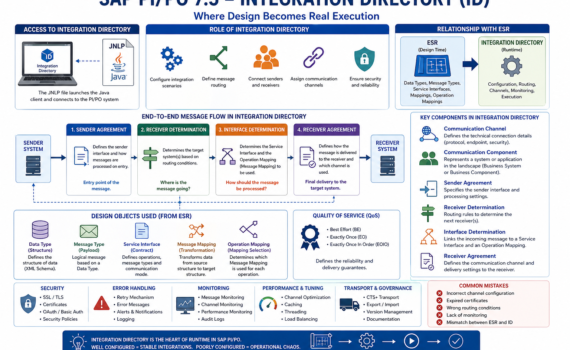
Integration Directory in SAP Process Orchestration: where design turns into real execution
Category:Programming,SAP,SAP PI/POHard truth (business-first, no fluff)
You can have a perfect design in ESR… but if your Integration Directory (ID) is poorly configured, nothing works. The ID is not a “nice-to-have”; it’s the operational core where decisions are made about who talks to whom, through which channel, and under what rules. This is where integration stability is either built—or destroyed.
1) What is the Integration Directory?
The Integration Directory (ID) is the PI/PO component responsible for runtime configuration of integrations.
If ESR is design, ID is live execution.
Executive analogy
- ESR = architectural blueprint
- ID = construction site
- Runtime = building in operation
2) Accessing the Integration Directory: JNLP
Like ESR, the ID is accessed via a Java-based client using a JNLP (Java Network Launch Protocol) file.
What does JNLP do?
- Launches the configuration client
- Connects to the PI/PO system
- Loads configuration objects
Analogy
JNLP is the remote control for operating your integration system.
Operational reality
- Java dependency
- Security and compatibility challenges
- Certificate configuration requirements
Practical insight: many connection issues are not SAP problems—they are Java issues.
3) Role of the Integration Directory in the architecture
The ID is responsible for:
- Configuring integration scenarios
- Defining message routing
- Connecting senders and receivers
- Assigning communication channels
Analogy
The ID is the logistics control center of your enterprise.
4) Key components of the Integration Directory
4.1 Communication Channel
Defines how systems connect.
Types
- REST
- SOAP
- IDoc
- File
- JDBC
Elements
- Protocol
- Endpoint
- Security
Analogy
It’s the network cable through which messages travel.
4.2 Communication Component
Represents a system in the landscape.
Types
- Business System
- Business Component
Analogy
It’s an actor in the integration ecosystem.
4.3 Sender Agreement
Defines:
- Which interface sends the message
- How it is processed on entry
Analogy
It’s the airport check-in counter.
4.4 Receiver Determination
Defines the target system(s) for the message.
Logic
- Condition-based
- Can be multiple receivers
Analogy
It’s the GPS deciding the destination.
4.5 Interface Determination
Defines:
- Which Service Interface to use
- Which mapping to apply
Analogy
It’s the instruction manual.
4.6 Receiver Agreement
Defines:
- How the message is delivered
- Which channel is used
Analogy
It’s the last-mile delivery logistics.
5) Full message flow
- Sender Agreement receives the message
- Receiver Determination selects destination
- Interface Determination defines transformation
- Receiver Agreement delivers the message
Analogy
Like shipping a package:
- Intake → sorting → transformation → delivery
6) Relationship with ESR
The ID consumes design objects from ESR:
- Data Types
- Message Types
- Service Interfaces
- Message Mappings
- Operation Mappings
Analogy
ESR = factory
ID = distribution
7) Data Type and Message Type at runtime
Although designed in ESR, they impact runtime behavior.
Function
- Message validation
- Payload structure
Analogy
They are the standard packaging format.
8) Service Interface in ID
Defines which operation is executed.
Types
- Synchronous
- Asynchronous
Impact
Determines message behavior.
9) Message Mapping execution
The ID uses mappings defined in ESR.
Function
Transforms data before delivery.
Analogy
It’s the real-time translator.
10) Operation Mapping
Defines which mapping is applied.
Usage
Configured in Interface Determination.
Analogy
It’s the strategy selector.
11) Advanced routing
Conditions
- XPath
- Context variables
Example
Route high-value orders to a different system.
12) Quality of Service (QoS)
Types
- Best Effort
- Exactly Once (EO)
- Exactly Once In Order (EOIO)
Analogy
It’s the delivery guarantee level.
13) Error handling
Strategies
- Retries
- Alerts
- Logging
Analogy
It’s the contingency plan.
14) Security in Integration Directory
- SSL
- Certificates
- OAuth
- Basic authentication
Analogy
It’s your system’s digital customs control.
15) Monitoring
Tools:
- Message Monitoring
- Channel Monitoring
Analogy
The operations control center.
16) Performance tuning
Best practices
- Avoid unnecessary mappings
- Use caching
- Optimize channels
17) Transport across environments
ID configurations are transported using:
- CTS+
- Export/Import
Risk
Misalignment between ESR and ID.
18) Governance
Key rules
- Consistent naming
- Versioning
- Documentation
19) Common mistakes
- Misconfigured channels
- Expired certificates
- Lack of monitoring
- Incorrect routing
20) Evolution toward the cloud
The future points to:
SAP Integration Suite
Key shift
- Web-based configuration
- API-first approach
- Event-driven architectures
21) Strategic conclusion
The Integration Directory is where:
- Design becomes business value
- Integrations come to life
Well configured:
- Stability
- Scalability
- Control
Poorly configured:
- Operational chaos