Apigee is a powerful native API management platform from Google Cloud that allows you to build, manage, and protect APIs in any environment or scale. With Apigee, you can create a consistent and reliable interface for your backend services using high-performance API proxies. These proxies give you detailed control over security, rate limiting, quotas, statistics, and much more for all your services.
What does Apigee offer?
Apigee provides an API proxy layer that sits between your backend services and internal or external clients looking to use your services. This proxy layer allows you to add a wide variety of policies to add security, traffic management, data mediation, extensions, and other functions to your APIs. Additionally, you can add custom code, conditional logic, fault handling, rate limiting, caching, and many other actions. All of this can be done without modifying the underlying backend services.
Who uses Apigee?
Apigee is designed to benefit two key types of users:
API producers: Those who compile and manage the APIs that expose their backend services.
API consumers: Those who use the data provided by the APIs in their client applications.
What are the challenges they face?
API producers face challenges such as security, visibility, and measurement parameters, while API consumers face challenges such as flexibility, ease of use, and reliability.
What are the key benefits of using Apigee?
Apigee’s API management offers features specifically designed to meet the needs of API producers and consumers. These benefits include API visibility, API statistics, and API reliability.
How to get started with Apigee?
To get started with Apigee, follow these steps:
Install Apigee following the instructions provided in the documentation.
Build your first API proxy following the indicated steps.
Add features to your proxies by configuring policies and implementing security measures.
To learn more ways to leverage Apigee on Google Cloud, try our tutorials and training. Start using Apigee today and take your APIs to the next level!
The world of computers is on the verge of a revolution. Quantum computing, a new paradigm based on the bizarre laws of quantum mechanics, promises to solve problems beyond the reach of even the most powerful classical computers. This article delves into the core principles of quantum computing and its potential impact on various fields.
At the heart of this revolution lies the concept of the qubit. Unlike traditional bits in classical computers, which can be either 0 or 1, qubits can exist in a state called superposition, representing both values simultaneously. This unique property allows quantum computers to explore a vast number of possibilities concurrently, leading to a dramatic increase in processing speed for specific tasks.
Imagine a maze with countless paths. A classical computer would have to explore each path one by one, a time-consuming process. A quantum computer, however, could explore all paths at once due to superposition, finding the solution much faster. This ability to tackle complex calculations efficiently holds immense potential for various fields.
One promising application is cryptography. The encryption methods we rely on today could be rendered obsolete by quantum computers, necessitating the development of entirely new algorithms. In drug discovery, simulating complex molecules could lead to the creation of life-saving medications with unprecedented speed and accuracy. Additionally, quantum computing could revolutionize optimization problems in fields like logistics and finance, leading to more efficient resource allocation and financial modeling.
However, quantum computing is still in its early stages. Building and controlling these complex machines requires significant technological advancements. Despite the challenges, the potential benefits are undeniable. As quantum computing matures, it has the power to transform numerous industries and usher in a new era of scientific discovery.
In conclusion, quantum computing offers a glimpse into a future where computers can solve problems once deemed impossible. By harnessing the strangeness of the quantum world, we can unlock groundbreaking advancements in various fields, shaping a more efficient and innovative world. The journey ahead holds immense challenges, but the potential rewards are worth the pursuit.
Machine learning, a powerful branch of artificial intelligence (AI), is revolutionizing the way computers interact with the world. Unlike traditional programming, where every step is explicitly defined, machine learning allows computers to learn and improve on their own. This article explores the core concepts of machine learning and its growing impact on our lives.
At its heart, machine learning involves algorithms that analyze vast amounts of data. By sifting through this data, the algorithms identify patterns and relationships. This newfound knowledge empowers the computer to make predictions and even intelligent decisions, all without being meticulously programmed for each scenario.
Imagine a machine learning algorithm tasked with filtering your emails. By analyzing your past actions, like marking emails as spam or important, the algorithm learns to identify similar patterns in new emails. Over time, it gets better at filtering your inbox, freeing you from unwanted clutter.
Machine learning’s applications are vast and ever-expanding. Recommendation systems on e-commerce platforms and streaming services leverage machine learning to suggest products or shows you might enjoy. Autonomous vehicles rely on machine learning algorithms to navigate roads, perceive their surroundings, and make critical decisions in real-time. Even fraud detection tools use machine learning to analyze financial transactions and identify suspicious patterns that might indicate fraudulent activity.
As machine learning continues to evolve, its influence on our lives will undoubtedly grow. From personal assistants understanding our needs to robots performing complex tasks, the possibilities are seemingly endless. However, it’s important to remember that machine learning is a tool, and like any tool, it needs to be wielded responsibly. Addressing potential biases in algorithms and ensuring ethical development are crucial considerations for the future of machine learning.
In conclusion, machine learning is transforming the way computers learn and interact with the world. By enabling machines to learn from experience, we unlock a new era of intelligent systems that have the potential to improve our lives in countless ways. As we move forward, fostering responsible development and harnessing the power of machine learning for good will be essential to unlocking its true potential.
Salesforce is a leading cloud-based customer relationship management (CRM) platform that helps businesses connect with their customers, sell more, and provide better service. With a wide range of features, Salesforce can be used to manage all aspects of the customer relationship, from marketing and sales to customer service and technical support.
What can Salesforce do for your business?
Increase sales: Salesforce helps you identify and close more deals by automating the sales process, managing leads, and tracking opportunities.
Improve customer service: Salesforce helps you deliver exceptional customer service by providing a single view of each customer, interaction history, and issue resolution.
Boost productivity: Salesforce helps you automate repetitive tasks, such as data entry and reporting, so your team can focus on what matters most: selling and serving customers.
Gain valuable insights: Salesforce provides you with reports and analytics that help you better understand your customers, identify trends, and make better business decisions.
What are the benefits of using Salesforce?
Scalability: Salesforce is a scalable platform that can grow with your business.
Ease of use: Salesforce is a user-friendly platform that doesn’t require technical expertise.
Customization: Salesforce can be customized to fit the specific needs of your business.
Security: Salesforce is a secure platform that protects your data.
How to get started with Salesforce?
Salesforce offers a variety of plans to suit the needs of businesses of all sizes. You can start with a free trial or contact a sales representative for more information.
Salesforce is a powerful cloud platform that can help businesses connect with their customers, sell more, and offer better service. If you’re looking for a way to improve your business, Salesforce is a great option to consider.
In modern enterprise application development, integrating with external services is a common requirement. SAP Process Orchestration (SAP PO) offers a robust platform for orchestrating business processes and integrating systems, including exposing RESTful web services. In this article, we will explore how to consume a RESTful web service exposed in SAP PO using Java and the Spring Framework, with basic authorization.
Assumptions:
Before we begin, let’s clarify some assumptions:
You have a basic understanding of Java and the Spring Framework.
You have access to an SAP Process Orchestration instance with a RESTful web service exposed.
The SAP Process Orchestration RESTful web service requires basic authorization.
Execution:
To consume the SAP Process Orchestration RESTful web service, follow these steps:
Set Up Your Project: Create a new Java project and add the required dependencies for the Spring Framework and Spring Boot. You can use Maven or Gradle for dependency management.
Create a RestTemplate Bean: In your Spring configuration class, create a bean for RestTemplate. This bean will be used to make HTTP requests to the SAP PO RESTful web service.java
@Configuration public class AppConfig { @Bean public RestTemplate restTemplate() { return new RestTemplate(); } }
Consume the RESTful Web Service: In your main class or service class, use the RestTemplate bean to consume the SAP PO RESTful web service. Replace https://your-sap-po-url.com/api/resource with the actual URL of your SAP PO RESTful web service, and replace your-username and your-password with your SAP PO credentials.
Run Your Application: Run your Java application. If everything is set up correctly, the application should make a GET request to the SAP PO RESTful web service and print the response body to the console.
Conclusion:
In this article, we have demonstrated how to consume a RESTful web service exposed in SAP Process Orchestration using Java and the Spring Framework, with basic authorization. By following the steps outlined in this article, you can integrate your Java applications with SAP PO and leverage its capabilities for business process orchestration and system integration.
Google Workspace is a cloud-based productivity suite that helps teams communicate, collaborate, and accomplish tasks anywhere, on any device. It’s easy to set up, use and manage, so your business can focus on what really matters.
Here are some highlights: Business email for your domain Look professional and communicate as [email protected]. Gmail’s easy-to-use features help you build your brand while getting more done.
Access from any location or device Check emails, share files, edit documents, host video conferences and much more at work, at home or on the go. You can pick up where you left off on a computer, tablet, or phone.
Enterprise-grade management tools Strong management settings give you full control over users, devices, security, and more.
Sign up with my link https://referworkspace.app.goo.gl/LYgi to get a 14-day trial and message me if you’d like to receive an exclusive discount when you try Google Workspace for your business.
In the realm of modern enterprises, seamless operations and efficient workflows are pivotal for sustained success. SAP Process Orchestration (SAP PO) emerges as a robust solution, harmonizing diverse systems and facilitating streamlined processes. This article delves into the essence of SAP PO, elucidating its functionalities, and outlining its transformative impact on organizational workflows.
How SAP Process Orchestration Works:
At its core, SAP Process Orchestration is a comprehensive tool designed to integrate, streamline, and automate business processes across various systems. It unifies disparate applications and data sources, offering a centralized platform for orchestration, monitoring, and optimization. Leveraging a combination of process integration, business process management, and connectivity capabilities, SAP PO enables the seamless flow of information and activities within an organization. Its adaptability to diverse environments and capacity to synchronize operations across different departments make it an indispensable asset in today’s complex business landscape.
SAP Process Orchestration (SAP PO) comprises several key components that collectively enable the integration, orchestration, and optimization of business processes within an organization. These components work synergistically to streamline operations and enhance efficiency:
Process Integration (PI): Formerly known as SAP NetWeaver PI, this component facilitates the seamless integration of disparate systems, applications, and data sources. It provides tools and capabilities to establish connections, transform data formats, and ensure smooth communication between various technologies.
Business Process Management (BPM): BPM within SAP PO allows for the modeling, execution, and continuous improvement of business processes. It offers a graphical environment where processes can be designed, monitored, and optimized, enabling organizations to adapt quickly to changing business requirements.
Business Rules Management (BRM): This component enables the management and application of business rules governing different aspects of operations. It allows for the creation, maintenance, and execution of rules that dictate how processes should behave under specific conditions.
Enterprise Service Repository (ESR): ESR serves as a centralized repository for storing integration objects, service interfaces, mappings, and other artifacts essential for integration scenarios. It provides a structured environment for managing and reusing integration assets across the organization.
Integration Builder: This tool within SAP PO assists in configuring and defining integration scenarios. It allows users to create, modify, and manage configurations for message processing, mappings, and connections between systems.
Monitoring and Analytics: SAP PO offers comprehensive monitoring and analytics capabilities. It provides real-time insights into the performance of integrated processes, allowing for proactive identification and resolution of issues, as well as optimization of workflows.
Adapter Framework: This framework supports connectivity to various systems and technologies, offering a wide range of adapters to facilitate communication with different applications, databases, and protocols.
These components collectively form a robust framework that empowers organizations to orchestrate, streamline, and automate their business processes, fostering agility, efficiency, and adaptability within the rapidly evolving business landscape.
“Business Add-In” hereinafter BADi, are an extension technology in the SAP environment (Systems, Applications, and Products in Data Processing). BADIs are predefined extension points in the source code of SAP applications, which allow developers to add, modify or customize standard functionality without modifying the original source code. This flexibility makes it easy to adapt SAP systems to the specific needs of an organization without compromising the integrity and future updating of applications. Through clearly defined interfaces, BADIs allow the incorporation of additional business logic and interaction with standard modules, thus contributing to greater agility and efficiency in the management of business processes.
To find and work with BADIs, follow these steps:
Identification of BADIs: First, determine which area or process of SAP you want to extend or customize. Investigate the SAP documentation and manuals related to that functionality to identify if there are BADIs available.
Transaction “SE18”: Access transaction “SE18” on the SAP home screen. This transaction allows you to search and view the definitions of BADIs.
Search for BADIs: In transaction “SE18”, enter the name of the BADI or a keyword related to the functionality you want to extend. This will provide you with a list of relevant BADIs.
Selection of BADI: Select the BADI that best suits your needs. Here you will see the description, the name of the standard implementation and other useful information.
BADI Implementation: Use transaction “SE19” to create an implementation of the selected BADI. You can provide a unique name for the deployment and choose whether it is local (only to your system) or global (spreads to other systems).
Logic Development: In the BADI implementation, you can add your own code to extend or modify the functionality. This allows you to integrate additional business logic according to your requirements.
Deployment Activation: Once you have completed the BADI implementation, activate it using transaction “SE19”. This will link your implementation to the corresponding BADI.
Test and Validation: Perform extensive testing to ensure that your BADI implementation behaves as expected and does not negatively impact standard functionality.
There are several approaches to find BADIS, here you will find four methods to do it
Method 1 : For this method, you must consider that the first step takes into account that the BADIS are registered in the SXS_INTER, SXC_EXIT, SXC_CLASS and SXC_ATTR tables and that they are accessed through the V_EXT_IMP and V_EXT_ACT views. In this way, each existing call to a BADI, the system makes use of the aforementioned tables. Therefore, one method to find the BADI we need is based on the use of transaction ST05(Performance Analysis). The following procedure will be carried out
1. Enter transaction ST05 and once there, select the “Table Buffer trace” checkbox and press the “Activate Trace” button..
2. Next, open a new mode and execute the transaction for which you want to find a BADI. 3. Once the program has been executed, we return to the screen where we had transaction ST05 and click on the “Deactivate Trace” button in order to finish the trace.
4.Once the trace has finished, click on the “Display Trace” button where the Trace will be filtered with the objects: V_EXT_IMP and V_EXT_ACT (views). 5. Press the “Copy (F8)” button, Fill Operations: OPEN and “Enter”.
Result : A list will be obtained with all the “interface class names” of the V_EXT_IMP views starting with IF_EX_*. This is the standard SAP prefix for “BADI class interfaces”. The name of the BADI is found after the prefix IF_EX_. For example, if the interface name is IF_EX_ADDR_LANGU_TO_VERS, the BADI is called ADDR_LANGU_TO_VERS.
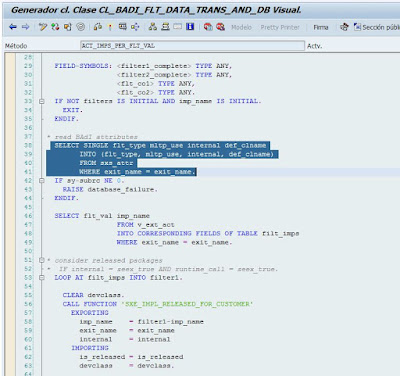
Method 2 : From transaction SE80, set a break-point in the “ACT_IMPS_PER_FLT_VAL” method of the “CL_BADI_FLT_DATA_TRANS_AND_DB” class just after the “SELECT” header with the comment “read BADI attributes”.
Then execute the transaction you want to analyze. For each stop at the debugger break-point, examine the “exit_name” and “internal” fields.
Method 3
1.Enter transaction SE24 (Class Builder) place a break-point in the CALL METHOD cl_exithandler=>get_class_name_by_interface which is inside the GET_INSTANCE method of the CL_EXITHANDLER class.
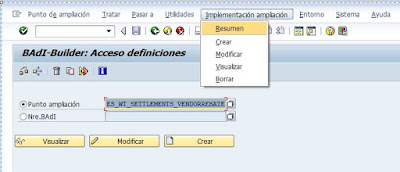
Then, execute the transaction or program to be verified. The variable exit_name shows the names of the BADIs that the program implements. This method can be cumbersome because it stops execution many times, but this ensures that if a BADI exists it will stop at that point. What is being done is putting a BREAK-POINT at the time SAP checks if a BADI definition has any active implementation; therefore, even if there is no active implementation for that particular BADI, the method will detect that a BADI exists at that point. To see if that BADI is implemented or not, go to Transaction SE18 with the name of the BADI obtained in the variable exit_name and go to the menu option
Implementations →Resume.
Method 4
Obtain the package (Development Class) of the transaction that you want to analyze using the transaction SE93. In transaction SE18, in the expanded search, search by filtering by the previously found package and the system will return all the BADIs related to that package. Taken from http://www.teknodatips.com.ar/sap-netweaver/29-como-encontrar-e-implementar-badis.html
In the ever-evolving world of technology, businesses are constantly seeking innovative ways to streamline their operations, enhance productivity, and foster seamless collaboration among employees. In this quest, Google Workspace emerges as a versatile and powerful solution that brings together a suite of tools and features designed to transform the way we work. Join us on a journey through the incredible benefits of Google Workspace and discover why it’s the ideal choice for businesses of all sizes.
What is Google Workspace?
Formerly known as G Suite, Google Workspace is a cloud-based productivity suite developed by Google. It comprises a collection of essential applications that are designed to empower teams to work smarter and more efficiently. These applications include Gmail, Google Drive, Google Docs, Google Sheets, Google Slides, Google Meet, and many more. By seamlessly integrating these tools, Google Workspace provides a comprehensive solution for communication, collaboration, and productivity.
The Benefits of Google Workspace:
Enhanced Collaboration: Google Workspace is built with collaboration in mind. With real-time editing and sharing capabilities, multiple team members can work on documents simultaneously. Comments and suggestions make it easy to provide feedback, ensuring that everyone is on the same page.
Effortless Communication: Gmail, the email service included in Google Workspace, is renowned for its reliability and user-friendly interface. You can access your emails from anywhere, and with integrated features like Google Chat, you can communicate with colleagues in real time.
Secure and Reliable: Google Workspace is hosted in Google’s secure data centers, offering robust security features like two-factor authentication, encryption, and data loss prevention. Google’s infrastructure ensures uptime and reliability, so your team can stay productive without interruption.
Scalability: Whether you’re a small startup or a large enterprise, Google Workspace can scale with your business. You can add or remove users easily, adapting the suite to your changing needs without significant IT overhead.
Work Anywhere, Anytime: The cloud-based nature of Google Workspace means your team can work from anywhere with an internet connection. This flexibility is invaluable in today’s global and remote work environments.
Cost-Effective: Google Workspace offers a pay-as-you-go pricing model, which means you only pay for the services you use. This eliminates the need for expensive hardware and software installations, saving your business money.
Integrated Workspace: With Google Workspace, everything is connected. You can store your files in Google Drive, collaborate on documents in Google Docs, and hold virtual meetings with Google Meet, all from a single platform. This integration streamlines your workflow and saves time.
Access to Google’s Ecosystem: Google Workspace seamlessly integrates with other Google services such as Google Calendar, Google Photos, and Google Analytics. This connectivity provides a comprehensive ecosystem for your business needs.
Join the Google Workspace Revolution Today!
In a fast-paced and interconnected world, staying ahead of the competition requires agility and adaptability. Google Workspace offers businesses the tools they need to succeed, providing a collaborative and productive environment that can scale with your company’s growth.
Join the ranks of leading organizations that have already harnessed the power of Google Workspace. Unlock your team’s potential, enhance productivity, and streamline your operations. Say goodbye to cumbersome email chains and file sharing challenges, and embrace a future where collaboration knows no boundaries.
Make the move to Google Workspace today and experience firsthand the transformative benefits that have made it the go-to choice for businesses worldwide. Your invitation to boost productivity and revolutionize collaboration awaits – don’t miss out!
In the realm of SAP ABAP development, adopting DevOps methodologies can bring about significant improvements in the development process, code quality, and collaboration between teams. To effectively implement DevOps for SAP ABAP, organizations can leverage the Solution Manager (SolMan) Custom Code Solution—a comprehensive toolset provided by SAP that empowers developers to streamline their workflows, ensure code quality, and drive collaboration with operations teams. This article explores the architecture of the SolMan Custom Code Solution and demonstrates how it facilitates the implementation of DevOps practices in SAP ABAP development.
The architecture of the SolMan Custom Code Solution comprises several key components that enable efficient DevOps implementation for SAP ABAP development:
Solution Manager (SolMan): SolMan serves as the central platform for managing SAP solutions, including ABAP development. It provides tools and functionalities to support various aspects of the development lifecycle, such as project management, requirements gathering, testing, and quality assurance.
Custom Code Lifecycle Management (CCLM): CCLM is a component within SolMan that specifically addresses ABAP development. It offers features for managing the entire lifecycle of custom ABAP code, including change management, code analysis, testing, and documentation.
Transport Management System (TMS): TMS is an integral part of the SolMan Custom Code Solution architecture, responsible for managing the transport of ABAP code changes across different SAP systems. It ensures controlled and efficient movement of code between development, quality assurance, and production environments.
Code Inspector and Quality Checks: SolMan provides tools like Code Inspector, which performs static code analysis to identify potential issues, adherence to coding guidelines, and performance bottlenecks. This facilitates continuous code quality monitoring, ensuring adherence to best practices and minimizing the introduction of defects.
Continuous Integration and Delivery (CI/CD) Pipelines: By integrating SolMan with CI/CD tools like Jenkins or GitLab, organizations can establish automated build, test, and deployment pipelines for ABAP development. This enables rapid delivery cycles, ensures early identification of issues, and supports continuous integration and delivery practices.
Collaboration and Documentation: SolMan facilitates collaboration between development and operations teams through features like central project documentation, change request management, and issue tracking. It provides a consolidated platform for communication, promoting transparency, andeffective collaboration throughout the development lifecycle.
Implementing DevOps practices for SAP ABAP using the SolMan Custom Code Solution offers several benefits. It streamlines the development process by automating key tasks, such as code analysis, testing, and deployment, leading to faster delivery cycles and increased productivity. The solution’s code quality checks and inspections help maintain a high standard of code quality and reduce the risk of introducing defects into the system.
Furthermore, the collaboration features provided by SolMan foster effective communication and alignment between development and operations teams. They enable seamless coordination of tasks, issue tracking, and documentation, leading to improved collaboration and overall software quality.
In conclusion, implementing DevOps practices for SAP ABAP development using the SolMan Custom Code Solution offers a powerful framework for streamlining development processes, ensuring code quality, and facilitating collaboration between teams. By embracing this approach, organizations can achieve faster delivery cycles, improved code stability, and enhanced overall software quality in their SAP ABAP implementations.