Introduction This article highlights an uncomfortable but liberating truth: most businesses don’t grow because they depend excessively on the founder. The owner becomes the bottleneck, doing everything, deciding everything, and carrying the operational burden.
It emphasizes that real growth comes when strong teams, replicable systems, and a distributed leadership culture are built. This article expands on that vision with depth, practical frameworks, operational checklists, and concrete strategies.
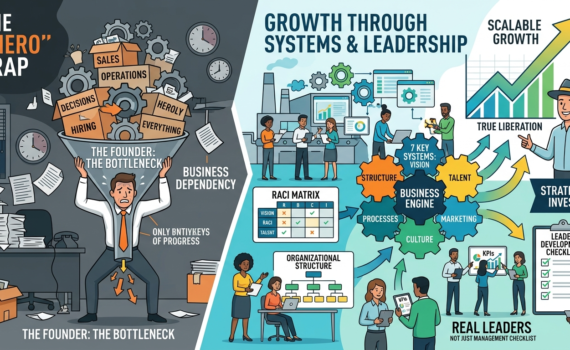
1. The “One Hero” Trap: Why Your Business Isn’t Growing
Many entrepreneurs fall into the trap of being indispensable. They work longer hours, control every detail, and end up enslaved by their own creation. Signs you’re in this trap:
You’re the only one closing major sales.
Strategic decisions stall if you’re not present.
The team expects constant instructions.
You bill well, but you don’t enjoy the money or have free time.
Moving from operator to leader requires a change in mindset: stop doing and start designing systems.
2. The 7 Fundamental Systems of Business Growth
A methodology has been developed based on 7 key systems:
Vision and Strategy System — Total team alignment with clear objectives.
Organizational Structure System — Defined roles, functional organizational chart.
Talent and Leadership System — Attracting, developing, and retaining leaders.
Process and Operations System — Documentation and standardization.
Financial and Metrics System — Control of numbers and profitability.
Marketing and Sales System — Predictable customer flow.
Culture and Ownership System — Sense of belonging and shared responsibility.
Each system is broken down with key indicators, tools, and examples.
3. How to Develop Real Leaders (Not Just with a Title)
“Many want the title, but not the power.” Developing leaders takes time, sound judgment, and sustained accountability.
Checklist for Developing Leaders on Your Team:
Identify candidates with potential (attitude + results).
Assign projects with real responsibility and accountability.
Provide weekly mentoring (one-on-one).
Teach data-driven decision-making.
Allow for controlled mistakes as learning experiences.
Measure not only results, but also the ability to replicate.
Celebrate visible leadership publicly.
Create a clear path for growth and compensation.
4. Organizational Structures that Scale
Recommended designs by stage:
Initial stage (up to 10 people): Flat and agile.
Growth (10-50): Departmentalization.
Scale (>50): Matrix or process-based.
Checklist for Designing Structure:
Map current processes.
Define clear responsibilities (RACI matrix).
Eliminate overlaps.
Create job descriptions.
Establish KPIs for each role.
Review every 6 months.
5. Effective Delegation: From Micromanagement to Trust Practical
steps for delegating:
Select the appropriate task.
Define expected results and standards.
Grant real authority.
Establish review points.
Give constructive feedback.
Recognize success.
6. Culture of Ownership and Sense of Belonging
Connect with previous topics: the team must benefit from growth. Combine systems with financial models (profit sharing, variable bonuses, etc.).
7. Common Mistakes That Hinder Growth
Hiring too quickly and firing too slowly.
Lack of process documentation.
Failing to measure what matters.
Resistance to change.
Lack of investment in training.
8. Practical 90-Day Roadmap for Implementing Systems
Month 1: Diagnosis + Vision + Structure.
Month 2: Processes + Talent.
Month 3: Metrics + Culture + Adjustments.
Includes detailed weekly checklists, templates, and success metrics.
9. Case Studies and Practical Examples
Analysis of companies that applied these principles.
10. The Founder’s Role in the New Stage:
From Maker → Strategist → Investor. How to prepare the company for sale or massive scaling.
Conclusion
The central message is clear: your business can grow much more when you stop being the center of attention and make your team the driving force. By applying the systems, checklists, and principles presented, any entrepreneur can break the cycle of dependency, develop leaders, and build a company that endures.
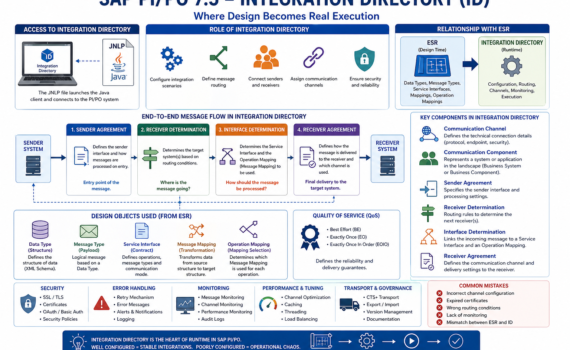
You can have a perfect design in ESR… but if your Integration Directory (ID) is poorly configured, nothing works. The ID is not a “nice-to-have”; it’s the operational core where decisions are made about who talks to whom, through which channel, and under what rules. This is where integration stability is either built—or destroyed.
1) What is the Integration Directory?
The Integration Directory (ID) is the PI/PO component responsible for runtime configuration of integrations.
If ESR is design, ID is live execution.
Executive analogy
ESR = architectural blueprint
ID = construction site
Runtime = building in operation
2) Accessing the Integration Directory: JNLP
Like ESR, the ID is accessed via a Java-based client using a JNLP (Java Network Launch Protocol) file.
What does JNLP do?
Launches the configuration client
Connects to the PI/PO system
Loads configuration objects
Analogy
JNLP is the remote control for operating your integration system.
Operational reality
Java dependency
Security and compatibility challenges
Certificate configuration requirements
Practical insight: many connection issues are not SAP problems—they are Java issues.
3) Role of the Integration Directory in the architecture
The ID is responsible for:
Configuring integration scenarios
Defining message routing
Connecting senders and receivers
Assigning communication channels
Analogy
The ID is the logistics control center of your enterprise.
4) Key components of the Integration Directory
4.1 Communication Channel
Defines how systems connect.
Types
REST
SOAP
IDoc
File
JDBC
Elements
Protocol
Endpoint
Security
Analogy
It’s the network cable through which messages travel.
4.2 Communication Component
Represents a system in the landscape.
Types
Business System
Business Component
Analogy
It’s an actor in the integration ecosystem.
4.3 Sender Agreement
Defines:
Which interface sends the message
How it is processed on entry
Analogy
It’s the airport check-in counter.
4.4 Receiver Determination
Defines the target system(s) for the message.
Logic
Condition-based
Can be multiple receivers
Analogy
It’s the GPS deciding the destination.
4.5 Interface Determination
Defines:
Which Service Interface to use
Which mapping to apply
Analogy
It’s the instruction manual.
4.6 Receiver Agreement
Defines:
How the message is delivered
Which channel is used
Analogy
It’s the last-mile delivery logistics.
5) Full message flow
Sender Agreement receives the message
Receiver Determination selects destination
Interface Determination defines transformation
Receiver Agreement delivers the message
Analogy
Like shipping a package:
Intake → sorting → transformation → delivery
6) Relationship with ESR
The ID consumes design objects from ESR:
Data Types
Message Types
Service Interfaces
Message Mappings
Operation Mappings
Analogy
ESR = factory ID = distribution
7) Data Type and Message Type at runtime
Although designed in ESR, they impact runtime behavior.
If your ESR design layer is messy, your operations will pay the price: unmaintainable mappings, hidden dependencies, and exploding delivery times. The ESR is not just another repository; it is your integration contract factory. Either you govern it with discipline… or it governs you.
1) What is the Enterprise Services Repository (ESR)?
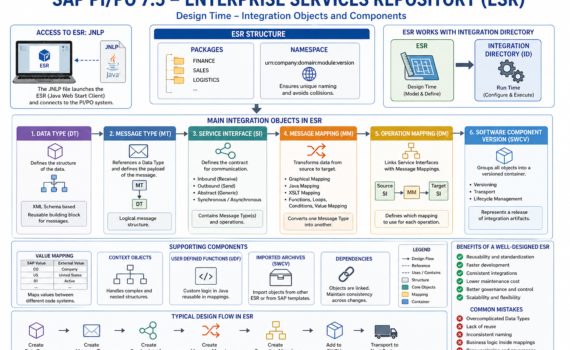
The ESR is the repository where all integration artifacts are modeled: data structures, service contracts, and transformations. It is the single source of truth for design.
Executive analogy: ESR is like the architecture department of a construction company. If the blueprint is wrong, the building collapses—even if execution is flawless.
2) Why ESR matters to the business
Reduces time-to-market (object reuse)
Avoids technical debt (clear contracts)
Increases governance (versioning and traceability)
Enables scalable integrations
Key KPI: reuse rate of Data Types and Service Interfaces. If you’re below 40%, you’re reinventing the wheel.
3) Accessing ESR: the infamous JNLP
The traditional ESR is accessed via a Java Web Start client using a JNLP (Java Network Launch Protocol) file.
What is JNLP?
A file that:
Defines the server URL
Specifies the client to launch
Opens the design tool
Analogy: JNLP is the master key to your integration factory.
Modern considerations
Java dependency (security/compatibility issues)
Local configuration requirements (certificates, proxy)
Shift toward web-based tools (but ESR is still widely used)
4) ESR structure: packages and namespaces
Packages
Group objects by functional domain:
FINANCE
SALES
LOGISTICS
Namespaces
Ensure unique naming across the system.
Analogy: Packages = folders Namespace = internet domain (prevents collisions)
Best practice: Use consistent naming: urn:company:domain:module:version
5) Data Type (DT): the foundation of everything
The Data Type defines the data structure (fields, hierarchies, types).
Characteristics
Based on XML Schema
Supports complex structures
Reusable
Analogy
A Data Type is the product mold.
Best practices
Avoid redundancy
Design granular structures
Version properly
6) Message Type (MT): the message wrapper
The Message Type references a Data Type.
Function
Defines the logical payload of the message.
Analogy
If the Data Type is the mold, the Message Type is the packaged product ready to ship.
7) Service Interface (SI): the contract
Defines how systems communicate.
Types
Outbound (sending)
Inbound (receiving)
Abstract (generic)
Elements
Message Types
Mode (synchronous/asynchronous)
Analogy
A legal contract: defines what is sent, how, and when.
Hard truth: If your interfaces are poorly designed, the issue is not technical—it’s business design.
8) Message Mapping: transformation layer
The Message Mapping converts an input message into an output message.
Tools
Graphical Mapping
Java Mapping
XSLT
Common functions
Concatenation
Conditions
Loops
Value Mapping
Analogy
It’s the assembly line where raw material becomes the final product.
Introduction: the “nervous system” of your digital enterprise
In any modern organization, systems don’t operate in isolation: ERP, CRM, e-commerce, banking, logistics, analytics—all need to communicate. SAP Process Orchestration acts as the central nervous system coordinating that communication.
From a business perspective: PI/PO is your integration hub. From a technical perspective: it’s a service bus with capabilities for orchestration, routing, transformation, and governance. From a practical perspective: it prevents a messy, unmaintainable point-to-point integration nightmare.
1) The map: what is the System Landscape?
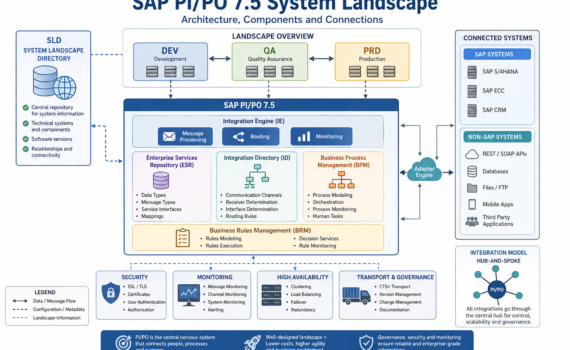
The System Landscape is the official map of all systems involved in integration—who they are, how they connect, what roles they play, and which rules they follow.
Clear analogy: think of an airport network
Each system = a city/airport
PI/PO = the control tower + central hub
Messages = flights
SLD = the global aviation map
Without that map, there are no reliable routes—only chaos.
2) The core piece: SLD (System Landscape Directory)
System Landscape Directory is the central repository of technical information about all connected systems.
What does the SLD store?
Technical systems (ECC, S/4, CRM, external systems)
Software versions
Integration components
Relationships between systems
Analogy
The SLD is like a digital land registry: it knows what exists, where it is, and how it connects.
Real impact
If your SLD is poorly maintained:
Interfaces fail
Transports break
Routing becomes inconsistent
Hard truth: most integration issues start with a neglected SLD.
3) Landscapes: DEV, QA, PRD
A professional landscape is split into:
DEV (Development): where you build
QA (Quality): where you test
PRD (Production): where business runs
Analogy
Building a car:
DEV = design
QA = crash testing
PRD = real road
Best practice
Never develop in production. That’s not agility—it’s operational risk.
4) Core components of the Landscape
4.1 Integration Engine (IE)
The message execution engine
Function:
Receives messages
Applies rules
Routes them
Analogy: the instinctive brain—fast decisions, direct action
4.2 Adapter Engine (AE)
Where all connectivity adapters live (REST, SOAP, IDoc, JDBC, File, etc.)
Function:
Connect SAP to external systems
Analogy: the USB ports of your integration platform
4.3 Enterprise Services Repository (ESR)
Repository of integration design objects:
Data Types
Message Types
Service Interfaces
Mappings
Analogy: the architectural blueprint of a city
4.4 Integration Directory (ID)
Runtime configuration:
Communication channels
Receiver determination
Routing logic
Analogy: a real-time GPS system
4.5 BPM (Business Process Management)
Handles complex process orchestration:
Sequences
Decisions
State handling
Analogy: an orchestra conductor
4.6 BRM (Business Rules Management)
Manages dynamic business rules
Analogy: the rulebook of the business
5) Types of systems in the Landscape
SAP systems
ECC
S/4HANA
CRM
Non-SAP systems
REST APIs
Databases
Mobile apps
Analogy
Think of a football team:
SAP = experienced core players
Non-SAP = external talent
PI/PO ensures they all play under the same strategy.
6) Communication types
Synchronous
Immediate response
Example: REST API
Asynchronous
Delayed processing
Example: IDoc
Analogy
Synchronous = phone call
Asynchronous = email
7) Integration models
Point-to-point (anti-pattern)
Each system connects directly to others
Result: exponential complexity
Hub-and-Spoke (PI/PO)
Everything goes through a central hub
Result: control and scalability
Hard truth: if you have more than 10 point-to-point integrations, you already have technical debt.
8) Transport and governance
Objects move between systems using:
CTS+
File-based transport
Analogy
Like moving containers between ports
Risk
Without governance:
Version inconsistencies
Production failures
9) Security in the Landscape
SSL
OAuth
Certificates
Basic authentication
Analogy
Your system’s border control
10) Monitoring and operations
Tools:
Message Monitoring
Channel Monitoring
Component Monitoring
Analogy
The air traffic control center
11) Scalability and high availability
Clustering
Load balancing
Failover
Analogy
An airport with multiple runways
12) Best practices (no sugarcoating)
Keep your SLD clean
Version everything
Avoid unnecessary complexity in mappings
Document as if you’re leaving tomorrow
13) Common mistakes
Outdated SLD
Overuse of BPM
Overcomplicated mappings
Lack of monitoring
14) The future of the Landscape
While PI/PO remains relevant, the roadmap clearly points to: SAP Integration Suite
Paradigm shift
On-premise → Cloud
Monolithic → Modular
Transport-based → DevOps-driven
15) Strategic conclusion
The System Landscape is not just technical—it’s a strategic asset.
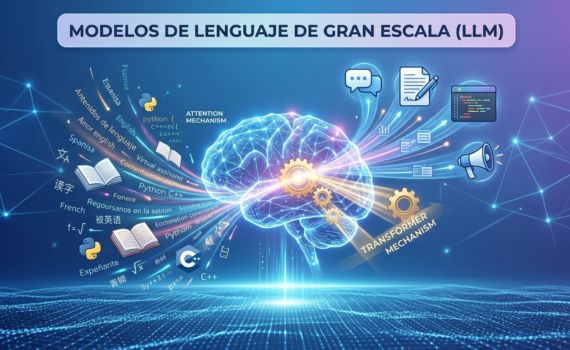
Large-Scale Language Models (LLMs) have represented one of the most significant advances in the field of artificial intelligence (AI) in recent years. These models are primarily based on deep neural networks, which has given them the ability to understand, generate, and manipulate human language with unprecedented accuracy and versatility. From virtual assistants like ChatGpt, Grok, Gemini, and DeepSeek to code-generating tools like Claude, text-summarizing tools, and even creative storytelling tools, LLMs are transforming the way we interact with technology.
In this article, we will explore what LLMs are, how they work, their practical applications, limitations, and the impact they are having on society. We will break down the technical concepts in an accessible way, provide practical examples, and discuss the future of this technology. This article is designed to be clear, concise, and didactic, with a focus on helping readers understand both the fundamentals and implications of LLMs.
2. What is a Large-Scale Language Model?
An LLM is a type of artificial intelligence model designed to process and generate text in natural language. These models are trained on vast amounts of text data (often billions of words) to learn linguistic patterns, grammatical structures, facts, and, to some extent, reasoning. LLMs are typically deep neural networks based on architectures like Transformers, which allow them to capture complex relationships between words and phrases.
Example 1: How does an LLM answer a question? Imagine you ask an LLM: What is the capital of France? The model doesn’t consciously “know” the answer, but it has been trained on millions of documents that mention Paris as the capital of France. By processing your question, the model predicts the most likely answer: “The capital of France is Paris.”
Main characteristics of LLMs:
Massive scale: Trained on enormous datasets (such as books, articles, websites, etc.).
Generalization ability: They can perform multiple tasks, from answering questions to translating languages or writing poetry.
Context: They are able to maintain context in long conversations or extensive texts.
Text generation: They can produce coherent and relevant text, such as stories, essays, or code.
3. How do LLMs work?
To understand how LLMs work, it is important to break down their key components: architecture, training, and inference.
3.1 Architecture: The Power of Transformers
Most modern LLMs are based on an architecture called Transformers, introduced in the seminal 2017 article “Attention is All You Need” by Vaswani et al. Transformers are particularly efficient at modeling the relationships between words in a sequence, thanks to a mechanism known as attention.
The attention mechanism allows the model to focus on the most relevant parts of a sentence or text when processing it. For example, in the sentence “The cat on the roof is black,” the model can identify that “cat” and “black” are related, even if they are separated by other words.
Example 2: Attention Mechanism in Action
Suppose a Language Modeling (LM) is processing the sentence: Maria bought a book that John recommended. The attention mechanism will assign greater weight to the connections between “Maria,” “book,” and “John,” somewhat ignoring less relevant words like “that.” This allows the model to understand who bought what and who recommended it.
3.2 Training: Learning from the World
LMs are trained in two main phases:
Pre-training: In this phase, the model is fed vast amounts of text (e.g., books, Wikipedia articles, social media posts) so that it can learn general linguistic patterns. This is done through tasks such as predicting the next word in a sentence (language modeling) or filling in missing words (masked language modeling).
Fine-tuning: In this phase, the model is further trained for specific tasks, such as answering questions, translating languages, or generating code. This is done to improve its performance in those specific areas.
Example 3: Pre-training in action Imagine a Language Learning Model (LLM) being trained on the text: The sun shines in the sky. During pre-training, the model might be tasked with predicting the word “sky” given the context “The sun shines in the.” By processing millions of similar phrases, the model learns that “sky” is a likely word in this context.
3.3 Inference: Generating responses
Once trained, the LLM enters the inference phase, where it generates responses based on the inputs.user. During inference, the model predicts the probability of each word in a sequence and selects the most appropriate one, adjusting to the provided context.
Example 4: Text Generation
If you give the model the input: Write a poem about autumn, the LLM will generate a sequence of words that form a coherent poem, such as:
Golden leaves fall slowly and bright,
the wind whispers on cold nights,
autumn paints the world calmly,
a canvas of reds and melancholy.
This is achieved because the model has learned poetic patterns and associations between words like “autumn,” “leaves,” and “wind.”
4. Applications of LLMs
Given their increasing popularity, LLMs have been implemented in a wide variety of fields. Below, we explore some of the most common ones, with practical examples.
4.1 Virtual Assistants LLMs are the basis of assistants like Gemini, Grok, and ChatGpt. These assistants can answer questions, offer recommendations, and engage in natural conversations.
Example 5: Conversation with an Assistant
User: How can I improve my productivity?
LLM: You can try techniques like the Pomodoro Technique, where you work for 25 minutes and then take a 5-minute break. Prioritizing tasks with the Eisenhower Matrix, which divides tasks into urgent and important, is also helpful.
4.2 Content Generation LLMs can write articles, stories, scripts, and more. For example, this very article could have been entirely written by an LLM or formatted by one.
Example 6: Generating a Short Story
Input: Write a short story about a lost astronaut.
Output: Astronaut Elena floated in the vastness of space, her damaged spacecraft adrift. Through her visor, the stars seemed to whisper ancient secrets. With limited oxygen, he decided to send a final message to Earth, not one of despair, but of awe at the vastness of the cosmos…
4.3 Language Translation
LLMs can translate text between languages with high accuracy, often outperforming traditional translators.
Example 7: Translation
Input (Spanish): El amor es un lenguaje universal.
Output (English): Love is a universal language.
4.4 Code Generation
LLMs can write code in languages such as Python, JavaScript, or C++, making them valuable to developers.
Example 8: Code Generation
Input: Write a Python function that calculates the factorial of a number.
Output: def factorial(n): if n == 0 or n == 1: return 1 else: return n * factorial(n – 1)
4.5 Education and Mentoring
LLMs can explain complex concepts in a simple way, answer academic questions, and provide examples. Example 9: Explaining a Concept
User: Explain what relativity is.
LLM: Relativity, proposed by Einstein, describes how time and space are interconnected. For example, a clock on a rocket traveling near the speed of light will tick more slowly than one on Earth, a phenomenon known as time dilation.
5. Limitaciones de los LLM
However, despite their constantly growing capabilities, LLMs face significant limitations that are crucial to understand when using them.
5.1 Falta de comprensión real
LLMs don’t “understand” the world like humans do; they simply predict patterns based on data. This can lead to incorrect or absurd answers in specific contexts.
Ejemplo 10: Error de un LLM
Usuario: ¿Cuántos dientes tiene un elefante?
LLM (respuesta errónea): Un elefante tiene 32 dientes. Realidad: Los elefantes tienen solo 4-6 molares grandes en un momento dado, no 32 dientes como los humanos.
5.2 Sesgos en los datos
LLMs can perpetuate biases, especially those already present in the data used for training.
For example, if the training dataset contains gender stereotypes, the model could generate biased responses.
5.3 Costo computacional
Training and running LLM requires a huge amount of computational resources, making it expensive and with a significant environmental impact. To truly understand why running an LLM is so expensive, we must differentiate between training (creating the model) and inference (using it to answer questions). While training requires months of massive computing power, inference presents a constant challenge in terms of scale and resources. Here we break down the technical factors that increase the cost of computing:
5.3.1 Memory Consume VRAM
Unlike traditional software that resides on the disk or regular RAM, an LLM must be fully loaded into the VRAM (Video RAM) of the graphics cards (GPU) to respond quickly.
Software
Parámeters and Precision: A model with 70 billion parameters (70B), if executed in 16-bit precision (FP16), requires at least 140 GB of VRAM just to exist in memory.
Quantization: To reduce this cost, quantization techniques are used that compress the model to 4 or 8 bits, allowing it to fit on less expensive hardware, albeit with a slight loss of precision.
5.3.2 The Attention Mechanism and Quadratic Complexity
El corazón del Transformer, el mecanismo de Auto-atención, es computacionalmente “hambriento”.
Complexity: Attention has a complexity of O(n2), where n is the length of the sequence (the context).
Impact: If you double the length of the question or document that the model must read, the computational effort to process the relationships between words quadruples. This explains why models with very large “context windows” (such as 128k or 1M tokens) require massive infrastructures of interconnected GPU clusters..
5.3.3 Token Operations (Flops)
Each time the model generates a single word (a token), it must perform billions of mathematical operations (matrix additions and multiplications)..
Sequential Generation: Unlike a Google search, which is nearly instantaneous, an LLM generates text word by word. For a 500-word response, the model must “go through” its billions of parameters 500 consecutive times.
Memory Bandwidth: The bottleneck is usually not the chip’s calculation speed, but the speed at which data moves between the GPU’s memory and its processing core.
5.3.4 Infrastructure and Energy
Keeping these models available 24/7 involves enormous operating costs:
Elite Hardware: Specialized chips such as the NVIDIA H100 or Blackwell are required, which cost more than $30,000 per unit.
Electricity and Refrigeration: A single AI server rack can consume as much energy as several average homes. Furthermore, constant liquid or air cooling adds a significant extra cost.
Cost Resume: Inference vs. Training
Factor
Training(Training)
Inference (Serving)
Duration
Months (only one)
Continued (per user)
Hardware
Thousands of GPUs synchronized
De 1 a 8 GPUs por instancia
Objetive
Adjust the net weights
Perform calculations with fixed weights
Main Cost
Energy and hardware depreciation
Bandwidth and latency
5.4 Hallucinations
LLMs sometimes generate false but plausible information, a phenomenon known as “hallucination”.
Example 11: Hallucinatión
Usuario: ¿Quién inventó el teléfono móvil?
LLM (respuesta incorrecta): El teléfono móvil fue inventado por Alexander Graham Bell en 1973. Realidad: Martin Cooper inventó el primer teléfono móvil en 1973.
This phenomenon in Large Scale Language Models (LLMs) is perhaps the most critical technical and ethical challenge facing generative AI today. We must consider that this is not a simple “software bug,” but rather an intrinsic characteristic of how these models are designed.
Next, we explore why they occur, what types exist, and how attempts are being made to mitigate them.
5.4.1 ¿Why an LLM Hallucinate?
To understand the phenomenon of hallucination, we must remember that an LLM is not a database or an encyclopedia; rather, it is a statistical token prediction engine..
Probability vs. Truth: The model chooses the next word based on its likelihood of appearing after the previous one, according to its training data. If the statistically most likely path is false, the model will follow it without hesitation.
Lack of a “World Model”: Since LLMs lack a physical or logical understanding of the real world, they don’t “know” that Alexander Graham Bell couldn’t have invented the cell phone in 1973 because they don’t understand the timeline as an absolute concept, but rather as a relationship of words.
Data Compression: During training, models must compress petabytes of information into a few gigabytes of parameters. During this “loss” process, specific details (dates, exact names, figures) often become blurred, creating false or mixed memories.
5.4.2 Types of Hallucinations
We can then classify hallucinations into two main categories:
Intrinsic Hallucinations: In these cases, the model directly contradicts the information provided in the prompt.
Example: You give it a text that says “The net profit was 5 million” and the model summarizes by saying “The company lost 5 million”.
Extrinsic Hallucinations: The model generates information that is out of context and factually false in the real world.
Example: Inventing a bibliographic citation from a famous author who never existed or creating a code function that uses a non-existent library.
5.4.3 Factors that increase the risk
Temperature (Creativity): When configuring the model, a high “temperature” setting will force the model to choose less likely words to be more creative, thus increasing the probability of hallucinating.
Confirmation bias (Sycophancy): The model will sometimes try to please the user. If you state something false in the question (“Why is the sun green?”), the model might “go along with you” and justify it.
Noisy training data: If the model read fake news or forums with errors during its training, it will replicate those errors as truths.
5.4.4 Mitigation Strategies: How do we solve it?
The industry is using several layers of security to “ground” the model:
RAG (Retrieval-Augmented Generation): It is the most effective technique. Instead of relying solely on the model’s “memory,” it allows you to search reliable external documents before responding.
RLHF (Reinforcement Learning from Human Feedback): Human trainers correct the model when it hallucinates, teaching it that “I don’t know” is also a valid answer and is preferable to a lie.
Verification Chains (CoVe): In this case, the model is asked to first generate an answer, then verify its own facts, and finally correct the original answer.
Technical Reflection:Ironically, the ability to “hallucinate” is what makes LLMs brilliant at poetry, brainstorming, and fiction. The challenge for modern engineering is to maintain creativity for artistic tasks and eliminate hallucination for precision work.
6. Ethics and social challenges
The use of LLM raises important ethical questions:
Privacity: The data used to train LLM may contain sensitive information.
Desinformation: The ability to generate convincing text can be used to create fake news.
Access: High-quality LLMs are often controlled by large corporations, raising concerns about equity and access.
Example 12: Ethics in content creation
An LLM could be used to create a fabricated article that appears credible, such as: Scientists discover that chocolate cures cancer. This highlights the importance of verifying sources and using LLMs responsibly.
7. Future of LLM
The LLM field is evolving rapidly. Some future trends include:
More efficient models: Researchers are developing LLMs that require fewer computational resources.
Multimodal Integration: LLMs are starting to combine text with images, audio, and other data.
Greater personalization: LLMs of the future could be better adapted to the individual needs of users.
Example 13: LLM multimodal Imagine an LLM that not only answers questions but also generates an image based on your description or analyzes a photo you upload. For example, you could say: Describe a beach at sunset and create an image, and the model would generate both the text and an illustration.
8. Conclusion
Large-Scale Language Models (LLMs) are a powerful tool that is redefining how we interact with technology. From answering questions to generating creative content or assisting with complex tasks, LLMs have enormous potential, but they also come with ethical and technical challenges. As this technology advances, it is crucial to use it responsibly and understand its limitations.
In this article, we have explored the fundamentals of LLMs, their operation, applications, limitations, and their impact on society. With practical examples, we hope to have provided a clear and instructive overview of this fascinating area of artificial intelligence.
9. References
Vaswani, A., et al. (2017). “Attention is All You Need.” Advances in Neural Information Processing Systems.
Brown, T., et al. (2020). “Language Models are Few-Shot Learners.” arXiv preprint arXiv:2005.14165.
Sitios web de xAI y otras fuentes confiables sobre IA.
In today’s digital landscape, enterprises rely heavily on seamless integration between platforms to maintain agility, optimize operations, and enhance digital transformation initiatives. SAP Process Orchestration (SAP PO) is a comprehensive integration software that enables the synchronization of processes and data across numerous SAP and non-SAP applications. One such integration possibility involves connecting SAP PO with OpenText’s SOAP API to facilitate efficient document management capabilities.
OpenText is a leading enterprise information management company known for its robust solutions, including its SOAP API which provides functionalities for document management. Integrating SAP PO with OpenText’s SOAP API allows organizations to achieve a streamlined connection between their business processes and their document management systems, thereby enhancing access to vital information and documents.
Before embarking on this integration journey, several key considerations must be addressed, including authentication mechanisms, message format mapping, and error handling. Given that SOAP (Simple Object Access Protocol) relies on XML-based messaging protocols, mastering these elements is critical for a successful and secure integration. This article will guide you through the essential steps for establish a secure connection to OpenText’s SOAP API and offer insights into how to authenticate users and manage documents effectively.
Goal
The goal of this article is to guide enterprises on connecting a legacy system to OpenText using SAP PO, and to generate a single endpoint that encapsulates multiple requests to different services exposed by OpenText. By achieving this, organizations can streamline their document management processes, reduce complexity, and enhance the efficiency of their operations.
The first step in order to achieve the integration of both systems will be to Establishing a secure and reliable connection between SAP PO and OpenText’s SOAP API requires robust authentication mechanisms.
In this case we will delve into the basic authentication. Understanding this methodology is crucial for safeguarding your data and ensuring authorized access only.
Once authenticated, the core of the integration lies in the consumption of document management features offered by the OpenText SOAP API. This section offers a step-by-step guide on how to configure SAP PO to interact with OpenText’s document management functionalities.
To simplify, the basic architecture will be structured this way.
A single interface is presented to the legacy system, which is then divided within SAP PI to engage multiple interfaces based on a custom tag referred to as method.
Step 1.
Generate a single data type with a common structure for the services that will be consolidated on one.
The following Data Type will be used as the request
And this Data Type will be used for the response
Transformation process involve several use of graphical mapping and XSLT transformations in order to achieve the goal to get a single entry point for all the exposed services, with the graphical mappings allowing to include transformations and validations in order to detect the data type received
Step 2
Define the graphical message mappings for request and response, one for each inbound service interface defined.
Step 3
At the response graphical mapping, add custom java functions in order to identify and set the data type of the values that are returning, the custom functions must to be embedded inside the mapping and be called as custom functions.
This custom function receive 5 entry parameters that are returned by the opentext get node method, evaluate the data type of the value and return a single text with the description of the type, the goal of this is reduce the complexity of the logic at the legacy system.
Here is the Java code of the custom function
at also another custom function was developed to validate the data type of any value returned at the Values tag
Step 4
Build the XSLT transformations in order to adapt the structure to the opentext services, this will add the corresponding namespaces, eliminate non necessary tags and generate the parents when will be need it.
Step 5.
Build the operation mapping that will be in charge of call sequentially the graphical message mapping and the XSLT transformations, this operation mapping will have one step for request and another for response considering the process defined as Synchronous.
Request side will at first call the graphical mapping and at second will use the XSLT transformation
The response side will call the XSLT transformation that will adapt the structure, then add the namespace and at last use the graphical mapping where the custom java functions are located
Once all the steps are done and the iFlow is created and deployed the service could be tested using SOAP UI.
Conclusion
This approach allow to generate a single endpoint to consume some specific methods of the Opentext implementation, allowing to get an homogeneous structure at response, but will require some work if new methods will be implemented, at also the architecture could be considered slightly coupled since maintenance could be required as well but not frequently.
The current architecture could face several challenges to be migrated to SAP Integration Suite running over BTP
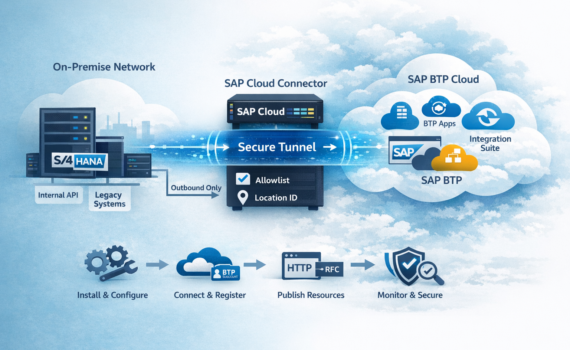
SAP Cloud Connector is not “just an installer.” It’s a security component that creates a controlled bridge between your on-prem network and SAP BTP. If you treat it like any other setup wizard, you’ll end up running it with too many privileges, opening more than you should, and having too little visibility. And yes—those shortcuts usually detonate in production, right on schedule.
That said, SCC is one of the most rewarding SAP platform building blocks when configured correctly: it reduces attack surface (traffic is outbound), enforces allowlists, separates environments with Location IDs, and gives your integration landscape a scalable foundation.
This DIY guide takes you from zero to “connected” with an enterprise-ready approach: prerequisites, architecture decisions, installation on Windows or Linux, connecting to your BTP subaccount, publishing resources (HTTP/RFC), testing, hardening, operations, and troubleshooting.
1) What SAP Cloud Connector is and when you need it
SCC is an agent that runs inside your network (datacenter or VPC) and establishes a secure tunnel to SAP BTP. Its purpose is to enable Cloud-to-On-Premise connectivity for services and apps in BTP without exposing internal systems to the Internet.
Typical use cases
SAP Integration Suite (Cloud Integration/CPI) consuming internal APIs (HTTP/S) or RFC into ECC/S/4HANA.
Apps on SAP BTP (Cloud Foundry / Kyma) accessing internal services (OData, REST, SOAP, RFC).
If your browser warns about a self-signed cert: normal at first. In enterprise environments, replace it.
8) First boot: initial setup without risky shortcuts
8.1 Lock down UI access
Admin/bastion only.
Don’t expose the UI to broad networks “because it’s easier.”
8.2 Replace the UI certificate (recommended)
Goal: encrypted, trusted admin access.
Generate TLS cert with correct CN/SAN.
Install it via supported keystore mechanism.
Remove “permanent” browser exceptions.
8.3 Configure proxy (if applicable)
If your org uses egress proxy:
Configure proxy in SCC (host/port, authentication if needed).
Validate stable connectivity to BTP.
8.4 Logs and traces
Standard levels in PRD.
Enable higher trace only for a purpose and time window. Leaving debug on in production is like leaving your mic unmuted in a leadership meeting: regrettable.
9) Connect to SAP BTP: subaccount and Location ID
9.1 Collect data in BTP Cockpit
You’ll need:
Subaccount ID
Region/host endpoint info
Registration method/credentials (per your setup)
9.2 Register SCC to the subaccount
In SCC UI:
Subaccount → Add Subaccount
Enter:
Region/host endpoint
Subaccount ID
Credentials
Location ID (highly recommended)
Save and confirm status Connected.
Platform tip: Location ID helps you operate multiple connectors cleanly and prevents “oops, the destination points to the wrong connector.”
10) Publish resources: the core value (the allowlist)
SCC is “publish only what you need.” That’s Zero Trust connectivity.
10.1 Define backend systems (On-Premise Systems)
In SCC UI:
Cloud To On-Premise
Add a system:
Type: HTTP, RFC (as needed)
Real internal host/port
Virtual host/virtual port (what BTP will see)
Save.
Recommendation: use virtual hosts that won’t collide with real DNS names. They are tunnel identifiers, not public endpoints.
10.2 Expose HTTP paths (Resources)
Allow specific paths such as:
/sap/opu/odata/
/sap/bc/srt/
/sap/bc/rest/
exact internal REST endpoints
Hard truth: exposing “/” is basically buying risk wholesale.
10.3 RFC (if applicable): minimum scope
For ABAP RFC:
Keep scope tight by design.
Decide between technical user with least privilege vs principal propagation (audit-driven).
11) BTP Destinations: making connectivity consumable
SCC enables the bridge. Consumption typically uses Destinations.
11.1 HTTP destination (conceptual)
BTP Cockpit → Destinations:
Name: S4_PRD_ODATA
Type: HTTP
URL: https://<virtualHost>:<virtualPort>
Proxy Type: OnPremise
Authentication: per backend (Basic, OAuth2, etc.)
Additional property (if applicable):
CloudConnectorLocationId
11.2 RFC destination (if your scenario uses it)
Type: RFC
Proxy Type: OnPremise
Authentication per your strategy
Location ID if applicable
Rule stays consistent: destination points to virtual host/port and OnPremise forces routing via SCC.
12) Testing: validate before handover
It’s expensive to discover network issues on go-live week.
12.1 Quick test checklist
SCC is Connected.
Backend is reachable from SCC host (DNS + port).
Resource is allowed in allowlist.
Destination exists and validates.
Functional test from consumer (CPI/app).
12.2 Recommended smoke tests
OData: call $metadata first.
HTTP: use a deterministic, small endpoint (health/status if available).
Resilience: restart SCC and confirm automatic reconnection.
13) Security and hardening: audit-ready
13.1 UI access
Admin/bastion only.
Role-based access and rotation.
Change traceability (who did what, when).
13.2 Certificates and TLS
Replace self-signed UI cert.
Keep NTP synced.
Validate backend trust chain if TLS is involved.
13.3 Strict allowlist
Publish only the required paths.
Version/export your resource list.
Use change management for critical updates.
14) Operations: don’t let it become “that server nobody touches”
14.1 Backups and recovery
Simple plan:
Export configuration.
Back up keystore/certificates.
Test restore procedure (not just write it).
14.2 Upgrades
Stay on supported versions.
Promote DEV → QA → PRD.
Maintenance window for PRD.
Rollback plan (snapshot or reinstall + restore).
14.3 Monitoring
Service up/down (Windows service / systemd).
CPU/RAM.
Recurring error patterns (TLS, DNS, proxy).
Latency (integration impact).
15) Troubleshooting: the 10 most common issues
1) Cannot connect to subaccount
Causes: blocked egress, proxy misconfig, DNS issues, SSL inspection. Fix: validate outbound 443, set proxy, check certificates/inspection.
2) Destination fails but SCC is connected
Causes: allowlist missing or wrong Location ID. Fix: verify allowed paths and destination Location ID property.
Day 1: install SCC in DEV, connect subaccount, publish minimum resources, create destinations, test.
Day 2: replicate in QA, run integrated tests with CPI/apps.
Day 3: hardening + runbook + monitoring + PRD preparation.
Go-live: PRD install with change window, smoke tests, formal handover.
Today’s challenge: produce a resource inventory (exact paths/services) with owners and business justification. If you can’t defend why something is exposed, don’t expose it. SCC is a bridge—not a sieve.
18) Sizing and high availability: when “it works” isn’t enough
In enterprise setups, SCC often becomes a platform component, so it must handle peaks, changes, and audits predictably.
18.1 How to size without guessing
Real usage depends on:
Calls per minute from CPI/apps
Payload sizes (big OData expansions hurt)
Latency to your BTP region
Trace levels
Pragmatic approach:
Start with 2 vCPU and 8 GB RAM.
Run load tests from the consumer (CPI/app) using realistic volumes.
If sustained CPU >60–70%, scale before PRD.
18.2 HA patterns (no magic promises)
SCC isn’t a load balancer. HA is designed:
Two SCC instances + consumer continuity: register both in the subaccount (often with different Location IDs), duplicate destinations or implement CPI/app fallback.
Infrastructure-level HA: failover at host/service layer with clear runbooks.
If integrations are mission-critical, invest in redundancy. Revenue pipelines and single tunnels don’t mix.
18.3 DR in two steps
Keep a standby SCC (or a ready host with the package installed).
Store configuration and certificates securely for rapid restore.
19) Certificates and truststore: where 70% of “won’t connect” comes from
Secure connectivity isn’t just “TLS enabled.” It’s end-to-end trust.
On-prem backend CA/certs: SCC must trust the backend chain.
Corporate SSL inspection: proxy re-signing can break handshakes.
19.2 Golden rule
If backend or proxy certificates change, schedule SCC validation. “Transparent” changes rarely are.
20) End-to-end example: publish an S/4HANA OData service and consume it from Integration Suite
20.1 In SCC: system and resource
Real internal system
Host: s4prd-internal.company.local
Port: 443
Virtual mapping
Virtual Host: vh-s4-prd
Virtual Port: 443
Allowlist
/sap/opu/odata/sap/ZSALES_ORDER_SRV/
20.2 In BTP: Destination
Name: S4_PRD_ZSALES_ODATA
Type: HTTP
URL: https://vh-s4-prd:443
Proxy Type: OnPremise
Authentication: Basic for DEV/QA; evolve to OAuth2/principal propagation as needed
CloudConnectorLocationId=LOC_S4_PRD (if used)
20.3 In CPI: consumption
Receiver HTTP/OData via Destination.
Smoke test $metadata.
Handle errors:
401/403: auth/roles
404: path not allowed or wrong mapping
5xx: backend/network
21) Principal propagation: when it’s worth it
Many projects start with a technical user to deliver fast. Good. Then auditors ask: “Who executed this transaction?”
That’s where principal propagation comes in—transmitting identity for backend traceability.
You need it when
Audit requires end-user identity
Strict segregation of duties
Strong traceability / non-repudiation
Delay it when
IAM strategy isn’t clear
Backends aren’t ready (trust/certs/mappings)
Priority is low-risk time-to-value
Best practice: ship a secure baseline (technical user + minimal allowlist), then plan principal propagation as a proper epic—not a last-minute “quick task.”
22) Governance: keeping SCC from becoming elegant shadow IT
Without governance, SCC becomes “everything exposed,” destinations with no owner, and a spreadsheet nobody trusts.
22.1 Minimal RACI
BTP platform team: standards and base destinations.
Blockchain is a distributed ledger technology that allows for secure, transparent, and tamper-proof transactions. It has the potential to disrupt many industries, including finance, supply chain management, healthcare, and government.
How does blockchain work?
Blockchain is a network of computers that are connected together and share a ledger of transactions. The ledger is a continuously growing list of records, called blocks, that are linked together using cryptography. Each block contains a number of transactions, and each transaction is verified by the network before it is added to the ledger. This makes it very difficult to tamper with the ledger, as any changes would be detected by the network.
What are the advantages of blockchain?
There are many advantages to using blockchain technology. Some of the key advantages include:
Security: Blockchain is a very secure technology because it is decentralized and there is no single point of failure. This makes it very resistant to hacking and fraud.
Transparency: All transactions on the blockchain are public and immutable, which makes it very transparent. This can help to build trust and confidence in the system.
Efficiency: Blockchain can streamline many processes and reduce the need for intermediaries. This can save businesses time and money.
Cost-effectiveness: Blockchain can be a more cost-effective way to record transactions and manage data.
Scalability: Blockchain can be scaled to handle a large number of transactions.
What are the potential applications of blockchain?
Blockchain has the potential to disrupt many industries. Some of the key potential applications include:
Finance: Blockchain can be used to record financial transactions, such as payments and loans. This could help to reduce fraud and improve efficiency in the financial sector.
Supply chain management: Blockchain can be used to track the movement of goods and materials through a supply chain. This could help to improve transparency and efficiency in the supply chain.
Healthcare: Blockchain can be used to store and share medical records. This could help to improve patient care and reduce costs.
Government: Blockchain can be used to record government transactions, such as land ownership and voting. This could help to increase transparency and efficiency in government.
What are the challenges of blockchain?
While blockchain has many potential benefits, there are also some challenges that need to be addressed. Some of the key challenges include:
Complexity: Blockchain is a complex technology and can be difficult to understand and implement.
Energy consumption: The mining process for some cryptocurrencies can consume a lot of energy.
Regulation: Blockchain is a new technology and there is still a lack of regulation in some areas.
Security risks: There are still some security risks associated with blockchain, such as the risk of hacking.
Conclusion
Blockchain is a promising technology with many potential applications. However, it is important to be aware of the challenges and limitations of blockchain before deploying it. With careful planning and execution, blockchain can be a powerful tool for improving efficiency, transparency, and security in many industries.
Stating that something is impossible may sound categorical, but in reality, it hides a much more complex truth. What is considered impossible today could be a tangible reality tomorrow. The history of humanity is littered with examples that corroborate this: from the dream of flight to the conquest of space, time and again we have challenged the limitations of our knowledge and technology to achieve what was previously considered improbable.
The Development of Knowledge and Technology: Scientific and technological advances are fundamental drivers of progress. As we expand our knowledge of the universe and develop new tools, the possibilities expand exponentially. What was unthinkable yesterday becomes an everyday reality today.
Examples That Defy the Impossible:
Flying: In the past, the idea of flying was considered a mythological fantasy. However, the invention of the airplane and the development of aviation completely transformed the way we travel.
Instant Communication: Long-distance communication was an unattainable dream until the invention of the telephone, radio, and the internet. Today, we can hold real-time conversations with people anywhere in the world.
Traveling to space: The conquest of space is an extraordinary achievement that has challenged our understanding of the universe. What was once a science fiction dream has become a tangible reality thanks to the development of rockets and space technology.
The importance of attitude and perseverance:
Claiming that something is impossible can be a mental barrier that limits our ability to innovate and progress. It is essential to maintain an open and receptive attitude to new ideas, no matter how far-fetched they may seem. Perseverance and determination are also key to overcoming obstacles and turning the impossible into the possible.
Conclusion:
Claiming that something is impossible is an act of presumption that ignores the potential of human ingenuity and scientific development. History teaches us that the limits of the possible are infinitely expandable. The key to achieving what is considered impossible today lies in the constant pursuit of knowledge, technological innovation, and an open and persevering attitude.
Remember:
The development of knowledge and technology expands the possibilities of what can be achieved.
History is full of examples that challenged the impossible and made it a reality.
Attitude and perseverance are key to overcoming obstacles and achieving the improbable.
Saying something is impossible limits the potential of human ingenuity and progress.
Dare to challenge the impossible. The future is full of possibilities waiting to be discovered.